
300-440 · Question #78
Drag and Drop Question A redundant service-side IPsec tunnel is created between the on-premises data center SD-WAN edge router and AWS. An engineer must configure dynamic routing between the SD-WAN…
The correct answer is Configure the feature template scope.; Configure the advanced BGP parameters.; Configure the label range and the route targets.; Configure the advanced parameters for the neighbor. BGP over IPsec Configuration Order - Explanation Context This scenario uses Cisco SD-WAN (vManage) feature templates to configure BGP with MPLS over redundant IPsec tunnels to AWS. The previously completed steps (BGP template, unicast address family, neighbors, MPLS interface)…
Question
Exhibit
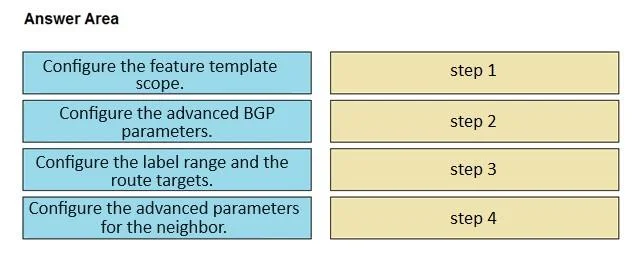
Answer Area
Drag items
Correct arrangement
- Configure the feature template scope.
- Configure the advanced BGP parameters.
- Configure the label range and the route targets.
- Configure the advanced parameters for the neighbor.
Explanation
BGP over IPsec Configuration Order - Explanation
Context
This scenario uses Cisco SD-WAN (vManage) feature templates to configure BGP with MPLS over redundant IPsec tunnels to AWS. The previously completed steps (BGP template, unicast address family, neighbors, MPLS interface) establish the foundation. The remaining four steps finalize the template.
The ordering follows a general → specific hierarchy: establish context first, then global parameters, then address-family specifics, then per-neighbor overrides.
Step-by-Step Reasoning
1. Configure the feature template scope
This must come first because it defines which device types and models the template applies to in vManage. Without declaring scope, vManage has no context for which platform-specific options to expose. Everything else is built inside this declared scope - skipping it or doing it later would mean configuring parameters with no valid target device context.
Common mistake: Assuming scope is set automatically or can be adjusted after parameters are entered. In vManage, scope determines available fields, so it is always the entry point.
2. Configure the advanced BGP parameters
With scope established, you configure global BGP process-level settings - things like graceful restart, BGP timers, keepalive intervals, and route reflector behavior. These are BGP-instance-wide settings that apply before any address-family or neighbor-level logic is layered on.
Common mistake: Confusing "advanced BGP parameters" with neighbor parameters. These are global to the BGP process, not per-neighbor.
3. Configure the label range and the route targets
This step is specific to the MPLS/VPN address family context. Since the MPLS interface was already configured, you now define the label range (which MPLS labels this router will use) and route targets (which VRFs import/export routes via BGP). Route targets are address-family-level constructs - they must be configured after the global BGP parameters are in place but before neighbor-specific policies are applied, since neighbors need the RT import/export policy to already exist when their advanced settings reference it.
Common mistake: Treating label ranges as a global BGP parameter (Step 2) rather than an address-family/VPN-specific one. They belong here because they are scoped to the VPNv4 or MPLS address family.
4. Configure the advanced parameters for the neighbor
Neighbor-level advanced settings (e.g., next-hop-self, route maps, prefix lists, AS override, per-neighbor timers) are the most granular layer. They can only be meaningfully configured once the BGP process scope, global parameters, and address-family settings (including route targets) are all defined - because neighbor policies often reference or depend on those constructs.
Common mistake: Configuring neighbor parameters before route targets exist, which can cause import/export policy references to fail or be incomplete.
Summary Table
| Order | Step | Why Here |
|---|---|---|
| 1 | Feature template scope | Sets device context - nothing else can be configured without it |
| 2 | Advanced BGP parameters | Global process settings before any specific address-family or neighbor config |
| 3 | Label range & route targets | Address-family/MPLS specifics; must exist before neighbor policies reference them |
| 4 | Advanced neighbor parameters | Most granular layer; depends on all prior configuration being in place |
The key principle: context before parameters, global before specific, process before per-neighbor.
Topics
Community Discussion
No community discussion yet for this question.