
PL-500 · Question #43
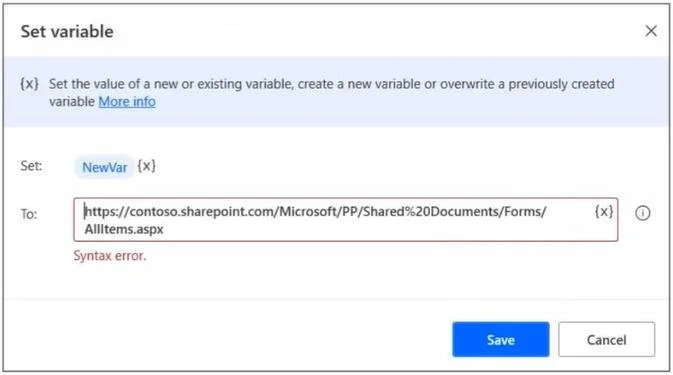
You create a variable named NewVar as shown in the configuration screen below. You attempt to set the value of NewVar to the following URL…
The correct answer is B. Replace the percent sign (%) with two percent sings (%%). In Power Automate Desktop, the percent sign (%) is a reserved character used to delimit variable names (e.g., %VariableName%). When a literal percent sign appears in a string value - such as '%20' in a URL-encoded path - the engine tries to interpret it as a variable reference…
Question
You create a variable named NewVar as shown in the configuration screen below. You attempt to set the value of NewVar to the following URL:
https//contoso.sharepoint.com/Mictosoft/PP/Shared%20Documents/Forms/AllItems.aspx The Set variable page alerts you that there is a syntax error. You need to resolve the issue. What should you do?
Exhibit
Options
- AEscape the forward slash characters (/) with a back slash (/).
- BReplace the percent sign (%) with two percent sings (%%).
- CReplace the forward slash characters (/) with two forward slash characters (//).
- DEscape the percent sign (%) with a back slash (%).
How the community answered
(62 responses)- A3% (2)
- B81% (50)
- C11% (7)
- D5% (3)
Explanation
In Power Automate Desktop, the percent sign (%) is a reserved character used to delimit variable names (e.g., %VariableName%). When a literal percent sign appears in a string value - such as '%20' in a URL-encoded path - the engine tries to interpret it as a variable reference and throws a syntax error when it cannot find a matching closing %. The fix is to escape the literal percent sign by doubling it (%%). So '%20' becomes '%%20' in the expression editor. The forward slash (/) is not a reserved character in this context and does not need escaping. This is a common gotcha when pasting URL-encoded strings directly into Power Automate Desktop variable assignments.
Topics
Community Discussion
No community discussion yet for this question.