
PL-500 · Question #20
Drag and Drop Question You are developing an automation solution for your company to process purchase orders emailed by customers. There are three purchase order mailboxes in Exchange Online for…
The correct answer is Create an environment variable in the development environment.; Create a cloud flow using the environment variable in the trigger step.; Set the current value in the environment to the mailbox email address.; Turn the cloud flow off and on. This question tests the ability to correctly sequence actions for using Power Platform environment variables to manage environment-specific configurations in cloud flows without modifying the deployed solutions.
Question
Exhibit
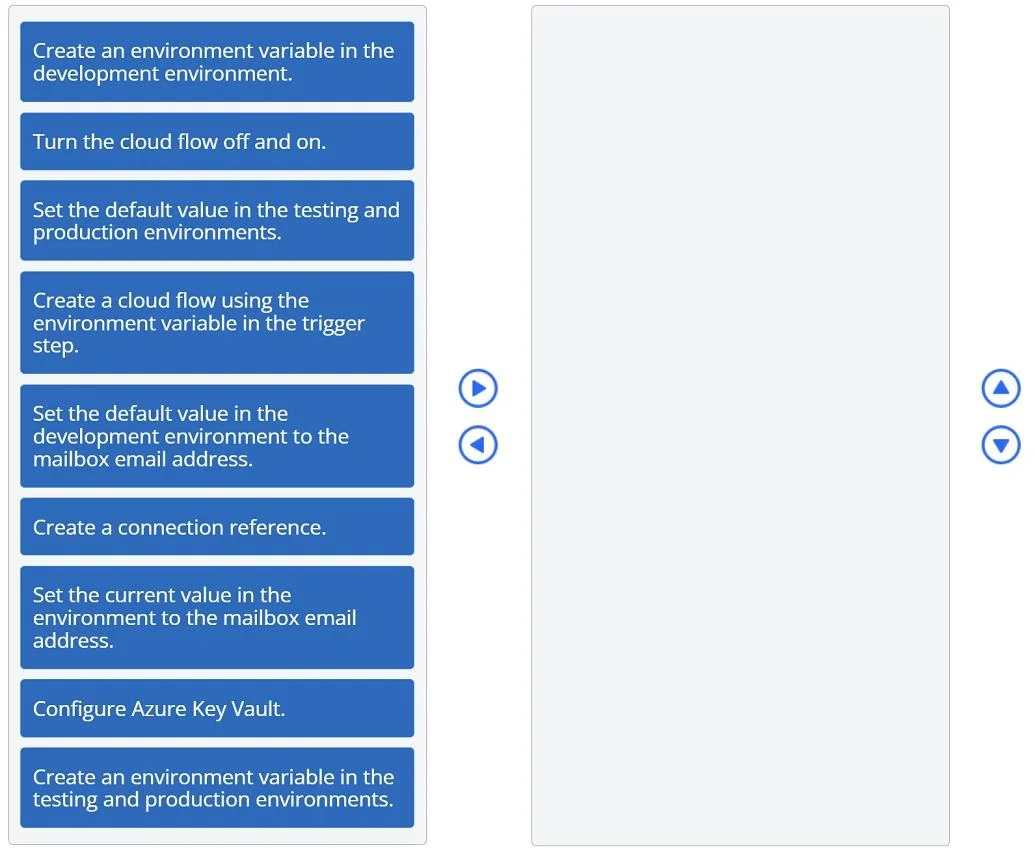
Answer Area
Drag items
Correct arrangement
- Create an environment variable in the development environment.
- Create a cloud flow using the environment variable in the trigger step.
- Set the current value in the environment to the mailbox email address.
- Turn the cloud flow off and on.
Explanation
This question tests the ability to correctly sequence actions for using Power Platform environment variables to manage environment-specific configurations in cloud flows without modifying the deployed solutions.
Approach. The core problem is to use different mailbox email addresses for a cloud flow across development, testing, and production environments without editing the flow itself in the latter environments. This is a classic use case for Power Platform environment variables.
- Create an environment variable in the development environment. This is the foundational step. You must first define the environment variable within your solution in the development environment to act as a placeholder for the mailbox email address.
- Set the default value in the development environment to the mailbox email address. Upon creating the environment variable, you typically assign it a default value, which in this case would be the email address for the development mailbox. This value also serves as the default if no environment-specific current value is set later.
- Create a cloud flow using the environment variable in the trigger step. With the environment variable defined, the cloud flow can now be built. The flow's trigger (e.g., 'When a new email arrives') should be configured to reference this environment variable for its 'Mailbox' parameter, making the flow dynamic.
- Set the current value in the environment to the mailbox email address. After the solution containing the environment variable and the flow is deployed to the testing or production environments, this crucial step is performed. For each target environment (testing, then production), the 'current value' of the environment variable is updated to reflect the specific mailbox email address for that environment. This overrides the default value and ensures the deployed flow automatically uses the correct mailbox without any manual modification to the flow itself, thus fulfilling the question's requirement.
Common mistakes.
- common_mistake. Several options are incorrect or less optimal:
- 'Create a connection reference': While connection references are vital for ALM with Power Automate, they apply to the underlying connection (e.g., an Outlook 365 connection), not directly to a specific parameter like a mailbox email address that is passed to a trigger. An environment variable (type Text) is more suitable for dynamically managing the mailbox address.
- 'Turn the cloud flow off and on': This is a operational or troubleshooting step, not a configuration action for setting up environment-specific parameters.
- 'Set the default value in the testing and production environments': Environment variables have a single default value (usually set during creation in dev). For target environments (test/prod), you set their current value, not a new default value for that environment.
- 'Create an environment variable in the testing and production environments': Environment variables are created once in the development environment within a solution. They are then deployed with the solution; you do not recreate them in each target environment. You only set their current values.
- 'Configure Azure Key Vault': While Key Vault is for secure secret management, for a simple mailbox address that can be stored in an environment variable, introducing Key Vault adds unnecessary complexity to this specific scenario and is not the direct method of integrating a dynamic mailbox address into a Power Automate flow trigger.
Concept tested. The core concept tested is the effective use of Power Platform environment variables for Application Lifecycle Management (ALM) in Power Automate cloud flows. This includes understanding how to define environment variables, set default and current values, and integrate them into flow triggers to manage environment-specific configurations (like email addresses) across different deployment stages (development, testing, production) without altering the deployed flow components.
Topics
Community Discussion
No community discussion yet for this question.