
PL-500 · Question #174
Drag and Drop Question You are working on an automation solution that uses multiple approval stages. You observe that each approval stage has the same logic. You build a dedicated child flow that…
The correct answer is Open child flow details.; Select Use this connection for each connection.; Save the parent flow.; Invite the parent flow owner as the run-only user. To fix the error preventing a parent flow from saving due to a child flow using 'run-only user' connections, the child flow's connection settings must be updated to use specific connections instead of being provided by the calling user.
Question
Exhibit
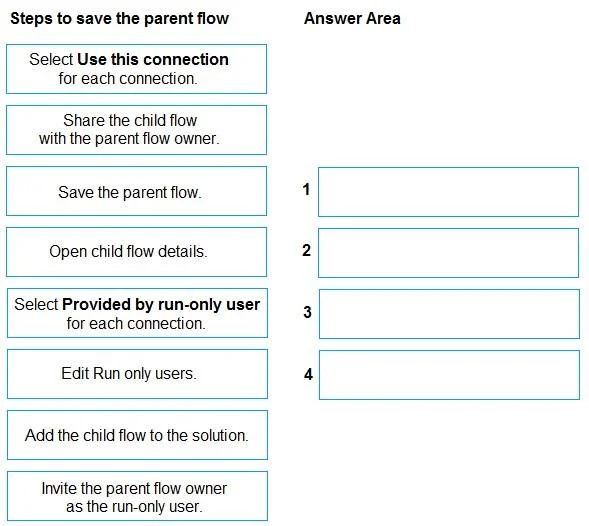
Answer Area
Drag items
Correct arrangement
- Open child flow details.
- Select Use this connection for each connection.
- Save the parent flow.
- Invite the parent flow owner as the run-only user.
Explanation
To fix the error preventing a parent flow from saving due to a child flow using 'run-only user' connections, the child flow's connection settings must be updated to use specific connections instead of being provided by the calling user.
Approach. The problem states that the parent flow fails to save because the child flow uses 'run-only user' connections. The error explicitly advises to 'Update the child flow for action 'Run_a_Child_Flow' to not use 'run-only user' connections.' This means we need to modify how the child flow handles its connections when it's being called by another flow (the parent flow).
Here's the correct sequence of four actions:
- Open child flow details. - The first step is to navigate to the child flow's settings page to make any modifications.
- Edit Run only users. - On the child flow's details page, there's a section to configure 'Run-only users' and their connection settings. Clicking 'Edit' on this section takes you to the configuration screen.
- Select Use this connection for each connection. - On the 'Run-only users' configuration screen, for each connector used in the child flow, you must change its setting from 'Provided by run-only user' (which causes the error when called by another flow) to 'Use this connection'. This ensures the child flow uses a pre-defined connection (typically the child flow owner's connection or a specific connection reference).
- Save the parent flow. - Once the child flow's connection settings are updated to no longer rely on run-only user connections, the parent flow can now be successfully saved without encountering the previous error.
Common mistakes.
- common_mistake. Common mistakes include:
- Selecting 'Provided by run-only user for each connection.': This option is the cause of the problem, not the solution. The error specifically instructs not to use 'run-only user' connections.
- Inviting the parent flow owner as the run-only user: This action is relevant if you are using 'Provided by run-only user' connections and need to specify who provides them. Since the goal is to stop using such connections, this step is incorrect.
- Sharing the child flow with the parent flow owner: While necessary for the parent flow to run the child flow, this action does not address the specific 'run-only user' connection error that prevents the parent flow from saving. The error is about the child flow's internal connection configuration, not sharing permissions for execution.
- Adding the child flow to the solution: This is a good practice for Application Lifecycle Management (ALM) in Power Automate but is not a direct step to resolve the specific connection error that prevents saving.
Concept tested. Microsoft Power Automate child flow management, specifically understanding and configuring 'Run-only user' settings and connection references for child flows. It tests knowledge of how child flows called by other flows (parent flows) must handle their connections, differentiating between 'Provided by run-only user' and 'Use this connection' options.
Topics
Community Discussion
No community discussion yet for this question.