
PL-500 · Question #173
Drag and Drop Question You create an automated flow to update a Microsoft SharePoint Online list based on an update that occurs in Microsoft Dataverse. The flow runs approximately 20 times per day…
The correct answer is Edit a cloud flow.; Modify the trigger settings.; Enable Concurrency Control.; Set Degree of Parallelism to 1. To ensure a Power Automate cloud flow runs only once at a time, you must edit the cloud flow, access its trigger settings, enable concurrency control, and set the degree of parallelism to one.
Question
Exhibit
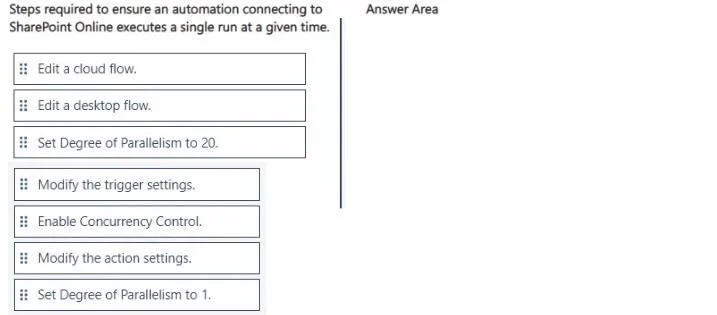
Answer Area
Drag items
Correct arrangement
- Edit a cloud flow.
- Modify the trigger settings.
- Enable Concurrency Control.
- Set Degree of Parallelism to 1.
Explanation
To ensure a Power Automate cloud flow runs only once at a time, you must edit the cloud flow, access its trigger settings, enable concurrency control, and set the degree of parallelism to one.
Approach. The problem describes a Microsoft Power Automate cloud flow (referred to as 'automated flow') that is failing due to multiple concurrent runs and needs to be updated to run 'once only'. The correct steps, in sequence, are:
- Edit a cloud flow. - The problem explicitly states 'an automated flow' and the context (SharePoint Online, Dataverse) points to a Power Automate cloud flow, not a desktop flow. This is the initial step to make any changes.
- Modify the trigger settings. - Concurrency control, which determines how many instances of a flow can run simultaneously, is configured at the trigger level of a Power Automate cloud flow. Modifying action settings would apply to a single action within the flow, not the overall flow's concurrency.
- Enable Concurrency Control. - Within the trigger settings, this option must be explicitly enabled before you can set the degree of parallelism. It's the switch that activates the concurrency management feature.
- Set Degree of Parallelism to 1. - Once concurrency control is enabled, setting the 'Degree of Parallelism' to 1 ensures that only one instance of the flow runs at any given time. This directly addresses the requirement to make the automation run 'once only'.
Common mistakes.
- common_mistake. 1. Edit a desktop flow. - The scenario clearly implies a cloud-based integration between Dataverse and SharePoint Online, which is handled by a Power Automate cloud flow, not a desktop flow.
- Set Degree of Parallelism to 20. - This action would allow 20 instances of the flow to run concurrently, which is the opposite of the requirement to run 'once only'. The problem implies the flow is already experiencing issues due to multiple runs, so increasing parallelism would worsen it.
- Modify the action settings. - While actions have their own settings, concurrency control for the entire flow instance is managed at the trigger level, not at the individual action level. Modifying action settings wouldn't prevent multiple flow instances from starting concurrently.
- Incorrect order. - Forgetting to 'Enable Concurrency Control' before attempting to 'Set Degree of Parallelism to 1' would be incorrect, as the parallelism setting is only available and effective when concurrency control is enabled. Similarly, modifying trigger settings must precede enabling concurrency control, as concurrency control is a sub-setting within the trigger configuration.
Concept tested. Power Automate Cloud flow concurrency control and trigger settings configuration. This tests the ability to manage how many instances of a flow can run simultaneously, specifically ensuring single-instance execution for critical processes.
Topics
Community Discussion
No community discussion yet for this question.