
PL-200 · Question #306
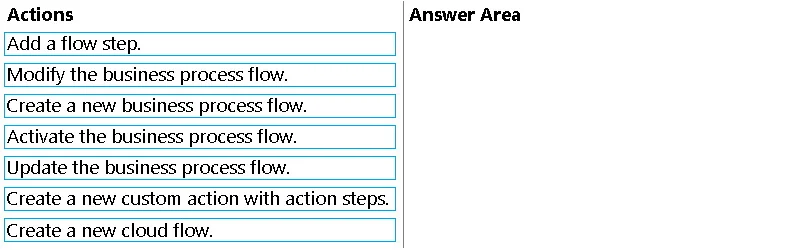
Drag and Drop Question A company has a business process flow that executes on the Contact table. The company requires that the steps in the flow be executed in real time when users create a new task…
The correct answer is Modify the business process flow.; Add a flow step.; Create a new custom action with action steps. To automate steps within an existing business process flow in real-time, the correct sequence involves modifying the flow, adding a new step for the automation, and creating a custom action to define the real-time logic.
Question
Exhibit
Answer Area
Drag items
Correct arrangement
- Modify the business process flow.
- Add a flow step.
- Create a new custom action with action steps.
Explanation
To automate steps within an existing business process flow in real-time, the correct sequence involves modifying the flow, adding a new step for the automation, and creating a custom action to define the real-time logic.
Approach. The problem requires implementing a solution to automate steps in an existing Business Process Flow (BPF) in real-time when specific events (new task, contact status update) occur. This typically involves adding custom, synchronous business logic to the BPF. The most appropriate sequence of actions, as demonstrated by the provided solution, is:
- Modify the business process flow: The initial step to alter an existing BPF is to open it in the designer for editing. This enables access to its structure, stages, and steps for any required changes.
- Add a flow step: Within the BPF editor, a new step needs to be inserted into one of the BPF stages. This new step will serve as the designated point where the real-time automation logic will be triggered or represented. At this stage, it acts as a structural element.
- Create a new custom action with action steps: For defining complex or reusable real-time business logic within the Dataverse platform (which powers Dynamics 365 BPFs), a custom action (often referred to simply as an "Action") is the most suitable method. It allows for encapsulating specific operations with defined inputs and outputs that can be invoked synchronously. This custom action will contain the detailed real-time automation logic. After its creation, it would then be linked to the newly added flow step (e.g., by associating the step with a real-time workflow that calls the custom action, or directly if the BPF designer supports an 'Action Step' type that directly invokes a custom action). This sequence allows for defining the structural modifications to the BPF first, followed by the creation of the specific automation logic that will populate or be linked to these structural changes.
Common mistakes.
- common_mistake. Several common mistakes or incorrect choices could be made:
- Creating a new business process flow: The problem explicitly states that a business process flow already exists and requires modification, not the creation of an entirely new one.
- Creating a new cloud flow: While Power Automate cloud flows are effective for automation, they are generally asynchronous. The requirement specifies "real-time" execution of steps in the flow (BPF). Custom actions and real-time workflows are typically employed for synchronous logic directly within the Dataverse platform, making them more appropriate for tightly integrated, real-time BPF automation.
- Activating the business process flow or Updating the business process flow: These actions relate to publishing, deploying, or making the BPF available for use after all design, implementation, and testing phases are complete. They are not part of the core implementation steps for adding new automation logic itself.
- Incorrect ordering of selected actions: For example, attempting to 'Add a flow step' that is intended to utilize a custom action before 'Creating a new custom action' would be illogical, as the required custom action would not yet exist to be referenced or configured within the step. While the provided correct order implies a workflow of defining structure before defining content, a logically dependent sequence (e.g., create custom action first, then modify BPF to add step linking to it) is also plausible, but the problem states 'more than one order is correct'.
Concept tested. The core concept tested is the ability to implement real-time automation within existing Business Process Flows (BPFs) in the Microsoft Power Platform/Dynamics 365, specifically understanding the role and sequence of modifying BPFs, adding steps, and creating custom actions for synchronous business logic.
Topics
Community Discussion
No community discussion yet for this question.