
PL-200 · Question #254
Drag and Drop Question A company plans to add another language to a Microsoft Dataverse environment. Several components were added or modified in the environment. You need to ensure that these…
The correct answer is Export and re-import translated text.; Create a separate version for each language.; Create a separate version for each language. This drag-and-drop question assesses knowledge of Microsoft Dataverse localization methods for different component types.
Question
Exhibit
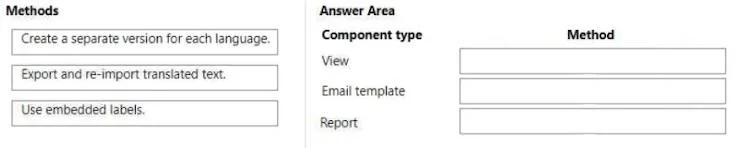
Answer Area
Drag items
Correct arrangement
- Export and re-import translated text.
- Create a separate version for each language.
- Create a separate version for each language.
Explanation
This drag-and-drop question assesses knowledge of Microsoft Dataverse localization methods for different component types.
Approach. To correctly answer this question, the test-taker must match the most appropriate localization method to each Dataverse component type based on standard practices:
-
View: For 'View,' the correct method is 'Export and re-import translated text.' Views in Dataverse consist of metadata like column headers, filter criteria, and view names. These labels are part of the solution components and are translated by exporting a translation file (XML), having the text translated, and then re-importing the file. This updates the UI labels for different languages.
-
Email template: For 'Email template,' the correct method is 'Create a separate version for each language.' Email templates often contain extensive free-form text, rich content, and specific formatting that goes beyond simple UI labels. The most effective and common way to fully localize the body and subject of an email template is to create distinct versions for each target language, allowing for complete customization of content and tone.
-
Report: For 'Report,' the correct method is also 'Create a separate version for each language.' Reports, especially complex ones like SSRS reports or Power BI reports embedded in Dataverse, contain embedded text, specific layouts, and often incorporate data-driven content that needs to be localized. Attempting to translate a single report definition comprehensively for all languages can be extremely complex. Creating separate report files (.rdl or similar) for each language provides the most robust and manageable solution for full localization of content, layout, and language-specific logic.
Common mistakes.
- common_mistake. A common mistake would be to misapply the 'Export and re-import translated text' method to Email templates or Reports. While some minor elements (like a report title or an email subject field's label) might be translatable through the export/import mechanism, this method is primarily for UI labels and metadata, not for the full content and structure of complex documents like email bodies or entire report layouts. Conversely, creating a separate version for a 'View' would be inefficient and incorrect; Dataverse handles view label translations centrally via the export/import of translations. The method 'Use embedded labels' is generally not a standalone localization method for these component types but rather refers to where the text resides before it's translated, often requiring one of the other methods (like export/import for solution labels) to actually perform the translation process. Hardcoding 'embedded labels' directly without an externalized translation process is poor practice for localization.
Concept tested. Microsoft Dataverse (Dynamics 365) localization and internationalization strategies, specifically understanding the appropriate methods for translating different types of application components like views, email templates, and reports.
Topics
Community Discussion
No community discussion yet for this question.