
PL-200 · Question #220
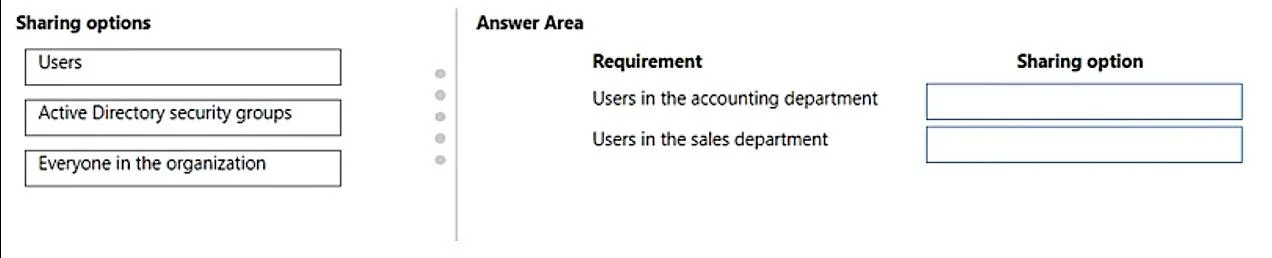
Drag and Drop Question A company is building a Power Virtual Agents chatbot. Users in the accounting department require access to collaborate with the building of the bot. Users in the sales…
The correct answer is Users; Active Directory security groups. This question tests the understanding of appropriate sharing mechanisms in Power Virtual Agents for different user access requirements, distinguishing between collaboration access and end-user access.
Question
Exhibit
Answer Area
Drag items
Correct arrangement
- Users
- Active Directory security groups
Explanation
This question tests the understanding of appropriate sharing mechanisms in Power Virtual Agents for different user access requirements, distinguishing between collaboration access and end-user access.
Approach. To correctly answer this question, drag 'Users' to 'Users in the accounting department' and 'Active Directory security groups' to 'Users in the sales department'.
-
Users in the accounting department require access to collaborate with the building of the bot: For collaboration, especially during development, specific individuals or a small, defined group are typically granted editor or co-owner access. The 'Users' sharing option allows granting access to specific user accounts, which is suitable for a targeted collaboration scenario where only certain individuals within accounting are involved in bot development.
-
Users in the sales department require access to only chat with the bot: For end-user access to chat with the bot, especially for an entire department, using an 'Active Directory security group' is the most efficient and scalable method. You can add all sales department users to a security group and then grant that group user access to the bot. This ensures that all members of the department have access without managing individual permissions, and new members automatically gain access while leaving members lose it upon removal from the group.
Common mistakes.
- common_mistake. 1. Dragging 'Active Directory security groups' to 'Users in the accounting department': While technically possible to create a security group for accounting collaborators, the 'Users' option often implies more direct, individual-level assignment for specific collaborators, which is common in development scenarios. Using a security group for a small number of collaborators might be over-engineering, whereas 'Users' is direct. In the context of the available options and typical PVA sharing practices for collaboration, 'Users' is generally preferred for specific individuals working on the bot.
- Dragging 'Users' to 'Users in the sales department': Adding every single user in the sales department individually to chat with the bot would be an administrative burden and highly impractical for a large group. Active Directory security groups are designed for managing access for entire departments or larger user populations.
- Dragging 'Everyone in the organization' to either requirement: This option is too broad for both scenarios. The accounting department needs specific collaboration access, not organization-wide. The sales department needs their department to chat, not everyone in the organization. 'Everyone in the organization' would only be appropriate if the bot was intended for general use by all employees, without any specific department-level restriction.
Concept tested. Power Virtual Agents bot sharing, access control, user management, and the appropriate use of different identity constructs (individual users, security groups, organization-wide access) based on specific access requirements (collaboration vs. end-user chat access). This aligns with role-based access control (RBAC) principles within Microsoft Power Platform.
Topics
Community Discussion
No community discussion yet for this question.