nerdexam
Microsoft

PL-200 · Question #221

Drag and Drop Question A company uses Power Apps. You create a custom table and configure a child table relationship with the contact table. You need to configure the cascading rules for each…

The correct answer is Restrict; Cascade All. This question tests knowledge of cascading behaviors for 1:N relationships in Dataverse/Power Apps, specifically how actions on a parent record (custom table) affect related child records (contact table).

Configure Microsoft Dataverse

Question

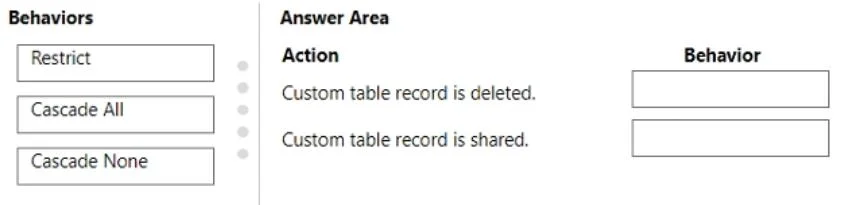
Drag and Drop Question A company uses Power Apps. You create a custom table and configure a child table relationship with the contact table. You need to configure the cascading rules for each action. Which behavior should you use? To answer, drag the appropriate behaviors to the correct actions. Each behavior may be used once, more than once, or not at all. You may need to drag the split bar between panes or scroll to view content. NOTE: Each correct selection is worth one point. Answer:

Exhibit
PL-200 question #221 exhibit

Answer Area

Drag items

RestrictCascade AllCascade None

Correct arrangement

  • Restrict
  • Cascade All

Explanation

This question tests knowledge of cascading behaviors for 1:N relationships in Dataverse/Power Apps, specifically how actions on a parent record (custom table) affect related child records (contact table).

Approach. For the action 'Custom table record is deleted.', the correct behavior is 'Restrict'. This setting prevents the parent record (custom table) from being deleted if there are any related child records (contact records) associated with it. This is a crucial setting for maintaining data integrity, ensuring that child records are not orphaned and that critical data isn't accidentally deleted. The user must first delete or reassign all child records before the parent can be deleted.

For the action 'Custom table record is shared.', the correct behavior is 'Cascade All'. This setting ensures that when a parent record (custom table) is shared with a user or team, all its associated child records (contact records) are also automatically shared with the same user or team. This provides a consistent access experience, allowing the user who can view the parent record to also view its related context in the child records, which is typically the desired outcome for collaboration and data visibility.

Common mistakes.

  • common_mistake. Using 'Cascade All' for 'Custom table record is deleted.' is generally incorrect unless there is a specific business requirement to mass delete related contact records when the parent custom table record is deleted. This can lead to unintended data loss and violates common data integrity practices. Using 'Cascade None' for 'Custom table record is deleted.' is also incorrect because it would allow the parent record to be deleted, leaving the child contact records orphaned and potentially pointing to non-existent parent data, which is a data integrity issue. Using 'Cascade None' for 'Custom table record is shared.' is incorrect because it would mean a user gaining access to the parent record would not automatically gain access to its related child records, leading to an incomplete view and potentially hindering usability and collaboration, as they might see the parent but not its necessary context.

Concept tested. Dataverse/Power Apps relationship cascading behaviors (1:N relationships), specifically understanding 'Restrict', 'Cascade All', and 'Cascade None' in the context of record deletion and sharing actions, and their implications for data integrity and user experience.

Topics

#Dataverse relationships#Cascading behavior#Table configuration#Data modeling

Community Discussion

No community discussion yet for this question.

Full PL-200 Practice