
Microsoft
PL-200 · Question #186
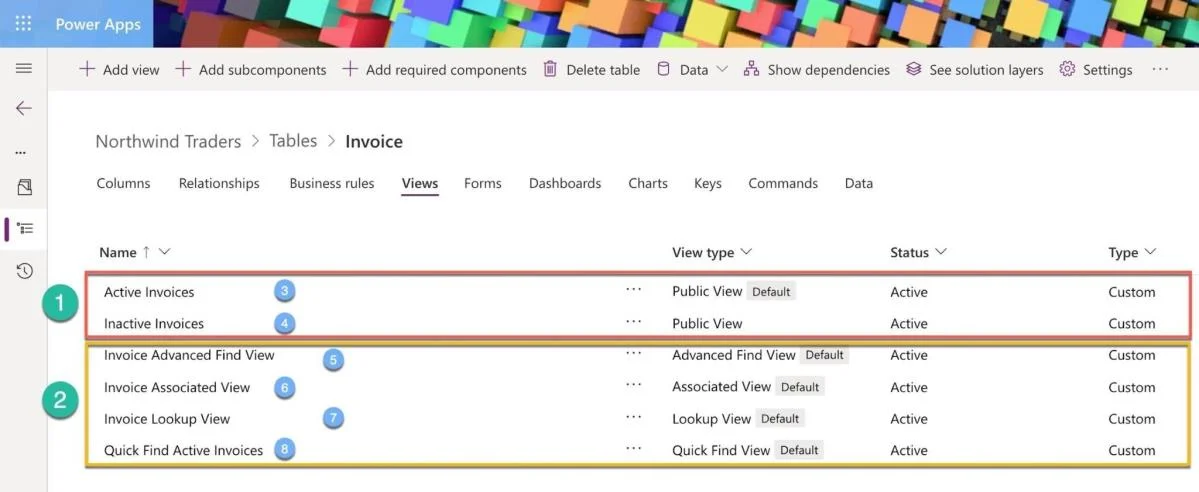
You create a new custom table Invoice in a model-driven app.
Sign in or unlock PL-200 to reveal the answer and full explanation for question #186. The question stem and answer options stay visible for context.
Configure Microsoft Dataverse
Question
You create a new custom table Invoice in a model-driven app.
Exhibit
Options
- AQuick Find Active Invoices
- BActive Invoices
- CInvoice Lockup View
- DInactive Invoices
- EInvoice Advanced Find View
Unlock PL-200 to see the answer
You've previewed enough free PL-200 questions. Unlock PL-200 for full answers, explanations, the timed quiz mode, progress tracking, and the master PDF. Question stem and options stay visible so you can still see what's on the exam.
Topics
#Dataverse tables#Model-driven app views#Default views#Table creation