
PL-200 · Question #185
You need to localize the solution for French-speaking users. What should you do first?
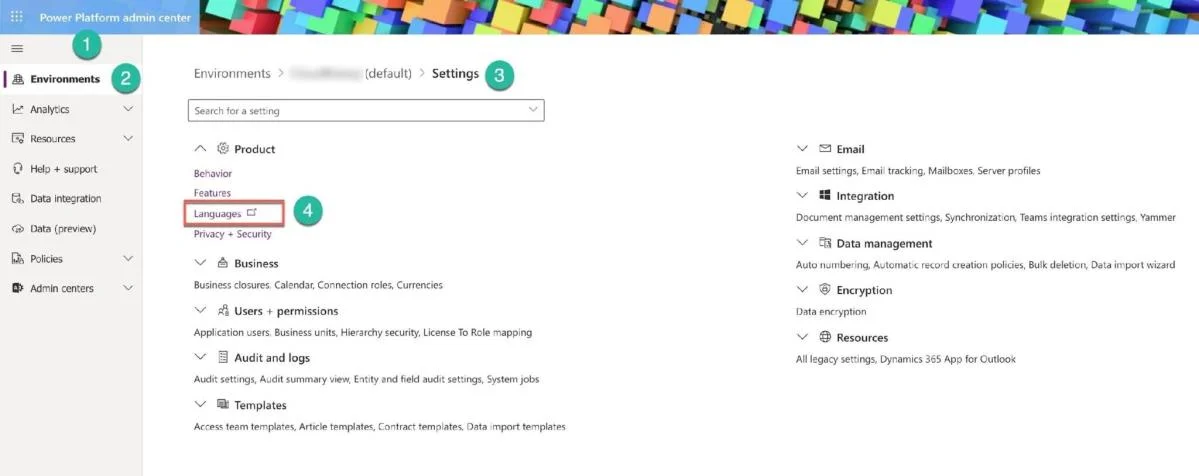
The correct answer is B. Enable Language Pack for French. Before you can use the second or multiple languages in your solution, you need to Enable Language Pack for the environment. You can do it from the Power Platform Admin center (Number 1) by selecting the Environments menu Item (Number 2) and then Settings (Number 3) for your…
Question
Exhibit
Options
- AAdd French as the Resource to the environment
- BEnable Language Pack for French
- CChange the base language from English to French
- DExport Translations
How the community answered
(31 responses)- A3% (1)
- B94% (29)
- C3% (1)
Explanation
Before you can use the second or multiple languages in your solution, you need to Enable Language Pack for the environment. You can do it from the Power Platform Admin center (Number 1) by selecting the Environments menu Item (Number 2) and then Settings (Number 3) for your environment. Next, under the Product section, you can choose the Languages item Power Platform opens the classic Language Settings screen (Number 1) with all languages. You need to select the check box for the required language (e.g., French (Number 2)) and push the Apply button (Number 3). The confirmation screen for your organization’s language change (enable or disable) (Number 4) comes up. After you push the OK button, it could take an hour or more to enable or disable a new language. Then you can use “Export Translations” for the translations of the solution’s components (like tables, attributes, relationships, forms, charts, views, etc.) labels. Option C is incorrect because you cannot change the base language after the environment https://docs.microsoft.com/en-us/power-platform/admin/enable-languages https://docs.microsoft.com/en-us/power-platform/alm/create-solutions-support-multiple-languages
Topics
Community Discussion
No community discussion yet for this question.