
PL-100 · Question #236
Drag and Drop Question You are designing a data model for a new app. The app will be supported by two tables. TableA will contain data that is unique to your industry. TableB will provide access to…
The correct answer is Custom; Virtual. To configure the tables based on the data source and purpose, TableA, containing unique industry data, should be a Custom table, while TableB, accessing read-only external data from Azure SQL, should be a Virtual table.
Question
Exhibit
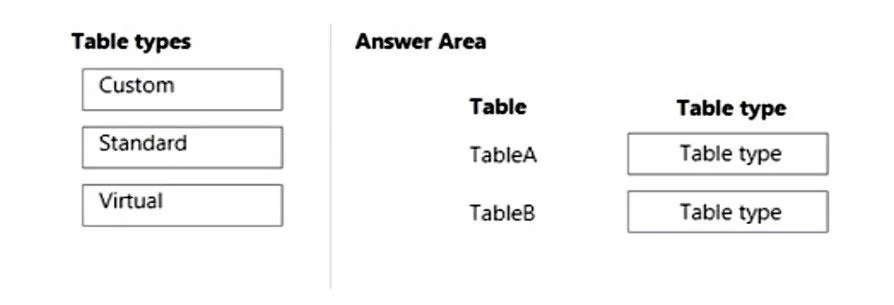
Answer Area
Drag items
Correct arrangement
- Custom
- Virtual
Explanation
To configure the tables based on the data source and purpose, TableA, containing unique industry data, should be a Custom table, while TableB, accessing read-only external data from Azure SQL, should be a Virtual table.
Approach. For TableA, which will contain data unique to your industry and is implied to be stored within the application's data source, the 'Custom' table type is appropriate. Custom tables (also known as custom entities in some contexts like Dataverse) are user-defined tables created to store specific business data not covered by standard, out-of-the-box tables. For TableB, which will provide access to read-only data from an Azure SQL database, the 'Virtual' table type is correct. Virtual tables (also known as virtual entities) allow integration of data from external data sources without storing that data directly within the application's primary data storage. They map external data to tables in the application, enabling read-only (or sometimes read/write, depending on the connector and configuration) access as if the data were native.
Therefore, the correct interaction is to drag 'Custom' to the 'Table type' box next to 'TableA' and drag 'Virtual' to the 'Table type' box next to 'TableB'.
Common mistakes.
- common_mistake. Selecting 'Standard' for either table would be incorrect. Standard tables (or out-of-the-box entities in Dataverse) are pre-built tables provided by the platform (e.g., Account, Contact, Case). The scenario explicitly states TableA contains 'data unique to your industry,' which rules out a standard table. Assigning 'Standard' to TableB is also wrong because TableB's data originates from an external Azure SQL database, which is the definition of a virtual table, not a standard internal table. Swapping 'Custom' and 'Virtual' would also be incorrect, as an external, read-only data source requires a virtual table, and new, internal, industry-specific data requires a custom table.
Concept tested. Dataverse (or similar platform) table types and their appropriate use cases, specifically Custom tables for new, application-specific data and Virtual tables for integrating external data sources.
Topics
Community Discussion
No community discussion yet for this question.