
PL-100 · Question #235
Drag and Drop Question You are developing an app that warehouse workers will run on their phones to perform inventory counts. You need to design the app. Which type of control should you use? To…
The correct answer is Text box; Combo box; Radio. This question assesses the ability to select appropriate user interface controls for common application requirements, focusing on data input, list selection, and status setting.
Question
Exhibit
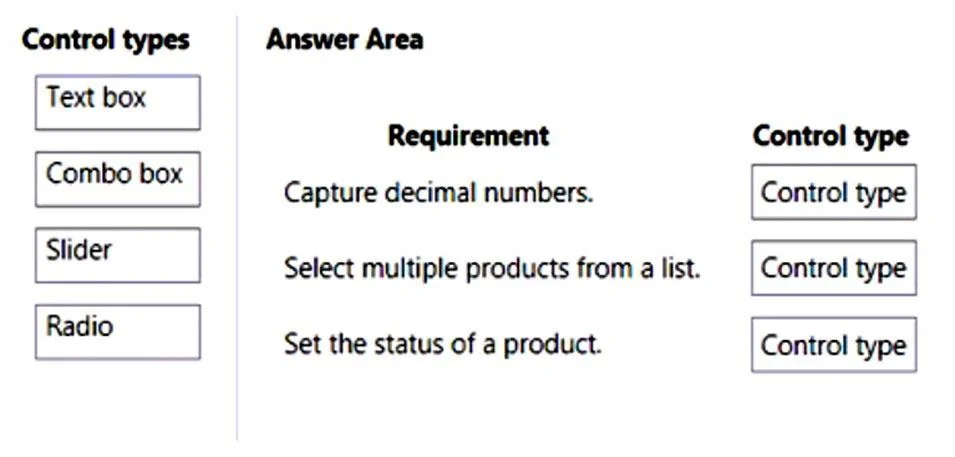
Answer Area
Drag items
Correct arrangement
- Text box
- Combo box
- Radio
Explanation
This question assesses the ability to select appropriate user interface controls for common application requirements, focusing on data input, list selection, and status setting.
Approach. The correct approach involves matching each requirement to the UI control that best serves its function:
- Requirement: 'Capture decimal numbers.' - A 'Text box' is the most suitable control. Text boxes allow users to input free-form text, which can then be validated to ensure it represents a decimal number. Sliders are typically for selecting values within a predefined range, often integers, not for arbitrary decimal input.
- Requirement: 'Select multiple products from a list.' - A 'Combo box' (or a multi-select list box, which is often a variant or considered under the umbrella of list selection controls) is the appropriate choice here. While a standard combo box (dropdown) is usually single-select, in the context of limited options, it's the only control provided that allows selection from a list of items, and some frameworks support multi-select functionality for combo box type controls or list boxes. Text boxes are for input, Sliders for ranges, and Radios for single, mutually exclusive choices.
- Requirement: 'Set the status of a product.' - 'Radio' buttons (Radio) are ideal for selecting a single option from a small, mutually exclusive set of choices, such as product statuses (e.g., In Stock, Out of Stock, Damaged). They clearly present all available options at once for easy selection. A combo box could also be used but radio buttons are generally preferred for small fixed sets of options.
Common mistakes.
- common_mistake. Common mistakes include misinterpreting the function of each control:
- Using 'Slider' for 'Capture decimal numbers.': A Slider is designed for selecting a value within a continuous or discrete range, often integers, and is not suitable for precise, free-form decimal input.
- Using 'Radio' for 'Select multiple products from a list.': Radio buttons are inherently designed for single selection from a set of mutually exclusive options, making them inappropriate for multiple selections.
- Using 'Text box' for 'Set the status of a product.': A Text box allows free-form input, which is not suitable for selecting a predefined status from a fixed list, as it would introduce data inconsistency. While 'Combo box' could be used for 'Set the status of a product,' 'Radio' is generally a better UI choice for a small, clearly defined set of mutually exclusive options.
Concept tested. User Interface (UI) control selection, understanding the purpose and appropriate use cases for common UI elements (text box, combo box, slider, radio button) in application design.
Topics
Community Discussion
No community discussion yet for this question.