
MS-900 · Question #49
Hotspot Question A to determine the appropriate application applications of Microsoft 365. You need to determine the appropriate application for a given scenario. Select the answer that correctly…
The correct answer is Users can create and edit video and audio and add text-to-speech recordings by using: Clipchamp. The question tests knowledge of Microsoft 365 application functionalities, specifically identifying Clipchamp as the tool for video and audio editing with text-to-speech capabilities.
Question
Exhibit
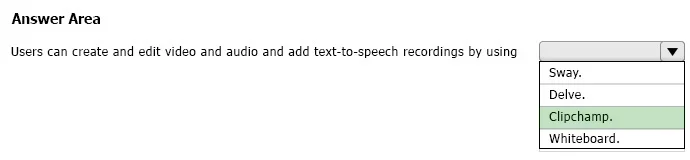
Answer Area
- Users can create and edit video and audio and add text-to-speech recordings by usingClipchamp.Sway.Delve.Clipchamp.Whiteboard.
Explanation
The question tests knowledge of Microsoft 365 application functionalities, specifically identifying Clipchamp as the tool for video and audio editing with text-to-speech capabilities.
Approach. To answer correctly, the test-taker must understand the primary function of each listed Microsoft 365 application. The scenario specifically mentions creating and editing video and audio, along with adding text-to-speech recordings. Among the given options:
- Sway is for creating interactive reports, presentations, and newsletters.
- Delve is for discovering information and people across Microsoft 365.
- Clipchamp is a video editor acquired by Microsoft that provides robust tools for video creation, editing, and includes features like text-to-speech.
- Whiteboard is a collaborative digital canvas for brainstorming and drawing.
Based on this analysis, Clipchamp is the only application that directly supports the described functionalities of video and audio editing with text-to-speech. Therefore, the correct interaction is to click the dropdown menu and select 'Clipchamp.'.
Common mistakes.
- common_mistake. Common mistakes include confusing the specific functionalities of different Microsoft 365 applications. Selecting 'Sway.' is incorrect because while Sway can incorporate videos, it is primarily a storytelling and presentation tool, not a dedicated video and audio editor with advanced features like text-to-speech editing. Choosing 'Delve.' is wrong because it's a content discovery tool, not a creation tool. Selecting 'Whiteboard.' is incorrect because it's a collaborative digital canvas for drawing and brainstorming, entirely unrelated to video or audio editing. The core error lies in not having precise knowledge of each application's core purpose and feature set within the Microsoft 365 ecosystem.
Concept tested. Understanding the specific use cases and feature sets of various Microsoft 365 applications, particularly distinguishing between tools for content creation (video/audio editing with text-to-speech), presentation, information discovery, and collaboration.
Topics
Community Discussion
No community discussion yet for this question.