
MS-900 · Question #417
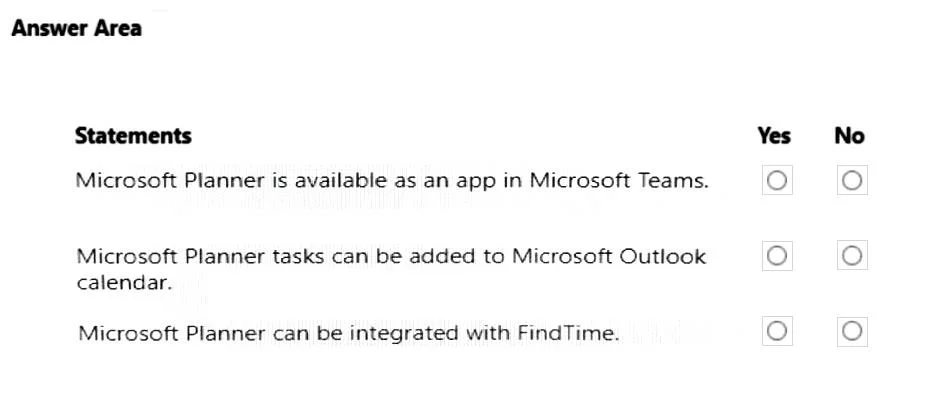
Hotspot Question A company is investigating Microsoft 365. For each of the following statements, select Yes if the statement is true. Otherwise, select No. NOTE: Each correct selection is worth one…
The correct answer is Microsoft Planner is available as an app in Microsoft Teams. = Yes; Microsoft Planner tasks can be added to Microsoft Outlook calendar. = Yes; Microsoft Planner can be integrated with FindTime. = No. The question tests knowledge of Microsoft Planner's integration capabilities with other Microsoft 365 applications like Teams, Outlook, and FindTime.
Question
Exhibit
Answer Area
- Microsoft Planner is available as an app in Microsoft Teams.Yes
- Microsoft Planner tasks can be added to Microsoft Outlook calendar.Yes
- Microsoft Planner can be integrated with FindTime.No
Explanation
The question tests knowledge of Microsoft Planner's integration capabilities with other Microsoft 365 applications like Teams, Outlook, and FindTime.
Approach. The correct interaction is to select the radio button next to 'Yes' for the first two statements and 'No' for the third statement, as shown in the second exhibit image.
-
Statement: Microsoft Planner is available as an app in Microsoft Teams.
- Correct Interaction: Select 'Yes'.
- Reasoning: Microsoft Planner is deeply integrated with Microsoft Teams. Users can add Planner tabs to Teams channels to manage tasks directly within Teams. There is also a dedicated 'Tasks by Planner and To Do' app in Teams that consolidates personal tasks from To Do and Planner tasks assigned to the user or from plans they are part of.
-
Statement: Microsoft Planner tasks can be added to Microsoft Outlook calendar.
- Correct Interaction: Select 'Yes'.
- Reasoning: While not directly adding individual Planner tasks as separate events to your personal Outlook calendar, there are several integration points. You can 'Publish' a Planner plan to an iCalendar feed, which can then be subscribed to from Outlook, displaying the plan's tasks with due dates in a separate calendar. More directly, tasks assigned to you in Planner appear in Microsoft To Do, which syncs with Outlook Tasks. In the 'My Tasks' view in Planner (which is powered by To Do), tasks with due dates can be explicitly added to your Outlook calendar.
-
Statement: Microsoft Planner can be integrated with FindTime.
- Correct Interaction: Select 'No'.
- Reasoning: Microsoft FindTime (now often referred to as Scheduling Assistant within Outlook for meeting polls) is a tool designed to help users find mutually convenient times for meetings by polling attendees. Microsoft Planner is a task management application. There is no direct or inherent integration between Planner and FindTime. They serve distinct purposes within the Microsoft 365 ecosystem.
Common mistakes.
- common_mistake. A common mistake would be to misinterpret the integration capabilities of Microsoft Planner. Selecting 'No' for the first statement is incorrect because Planner is a core app in Teams. Selecting 'No' for the second statement is incorrect because Planner tasks can indeed be surfaced in Outlook calendar via iCalendar subscriptions or integration with To Do/Outlook Tasks. Selecting 'Yes' for the third statement is incorrect as Planner and FindTime serve entirely different functions and do not have direct integration. Overlooking the subtle but effective ways Planner data can be surfaced in other applications (like iCalendar subscriptions for Outlook or the 'Tasks by Planner and To Do' app in Teams) would lead to incorrect answers.
Concept tested. The core concept being tested is the understanding of Microsoft Planner's features, its role within the Microsoft 365 ecosystem, and its integration capabilities with other key Microsoft 365 applications such as Microsoft Teams, Microsoft Outlook, and the distinction from tools like FindTime.
Topics
Community Discussion
No community discussion yet for this question.