
MS-900 · Question #283
Hotspot Question A company uses an on-premises deployment of Configuration Manager to manage its on- premises Windows devices. The company plans to purchase an Intune subscription and implement…
Co-management integrates Configuration Manager with Intune, enabling on-premises Windows devices to leverage cloud-based real-time management actions for enhanced responsiveness and flexibility.
Question
Exhibit
Answer Area
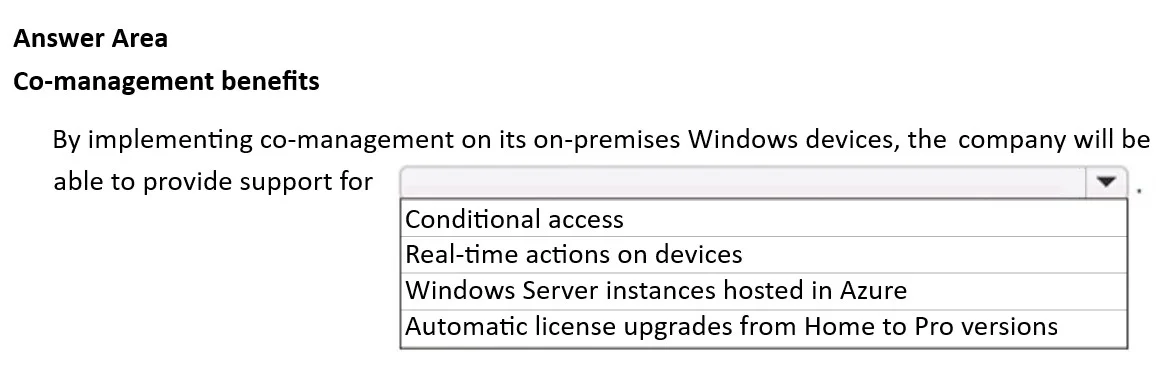
- By implementing co-management on its on-premises Windows devices, the company will be able to provide support forConditional accessReal-time actions on devicesWindows Server instances hosted in AzureAutomatic license upgrades from Home to Pro versions
Explanation
Co-management integrates Configuration Manager with Intune, enabling on-premises Windows devices to leverage cloud-based real-time management actions for enhanced responsiveness and flexibility.
Approach. The correct interaction is to click the dropdown menu and select 'Real-time actions on devices'. Co-management extends the management capabilities of existing on-premises Windows devices by enrolling them into Microsoft Intune alongside Configuration Manager. One of Intune's key strengths, which it brings to co-managed devices, is the ability to perform immediate, real-time actions. These actions include remote lock, wipe, restart, sync device policies, and push app installations, often with significantly lower latency compared to traditional Configuration Manager client communication models, especially for internet-connected devices not on the corporate network. This capability dramatically improves responsiveness for IT administrators and enhances the overall security posture by allowing swift intervention.
Common mistakes.
- common_mistake. 1. Conditional access: While co-management enables devices to be enrolled into Intune, which is a prerequisite for defining Intune compliance policies used by Azure AD Conditional Access, 'Real-time actions on devices' is a more direct and distinct operational benefit that Intune specifically brings to the management of these devices. Conditional access is a security framework that leverages Intune's compliance data, whereas real-time actions are direct, immediate operational commands.
- Windows Server instances hosted in Azure: Co-management is explicitly designed for Windows client operating systems (Windows 10/11) and does not extend to the management of Windows Server instances, whether on-premises or hosted in Azure. This option is fundamentally outside the scope of co-management.
- Automatic license upgrades from Home to Pro versions: While Intune can manage Windows editions and configurations, co-management itself does not inherently provide or 'support' automatic license upgrades from Home to Pro versions. Such upgrades are typically tied to specific licensing agreements (e.g., Microsoft 365 subscriptions or volume licensing) that provide the entitlement. While Intune could deploy the configuration to activate an already-entitled upgrade, it's not a primary or direct benefit of co-management in the same way that enhancing real-time operational control is.
Concept tested. The core concept tested is the understanding of Microsoft Intune and Configuration Manager co-management, its primary benefits, and the specific capabilities that Intune brings to on-premises Windows client devices when integrated with an existing Configuration Manager environment. It assesses knowledge of how co-management enhances device management, particularly through cloud-powered features like real-time actions.
Topics
Community Discussion
No community discussion yet for this question.