
MS-900 · Question #274
Hotspot Question A company plans to implement Microsoft 365 Copilot Chat. Select the answer that correctly completes the sentence. Answer:
To transform a Microsoft 365 Copilot response into an editable and collaborative workspace, the correct feature to utilize is Copilot Pages, which leverages Microsoft Loop's capabilities.
Question
Exhibit
Answer Area
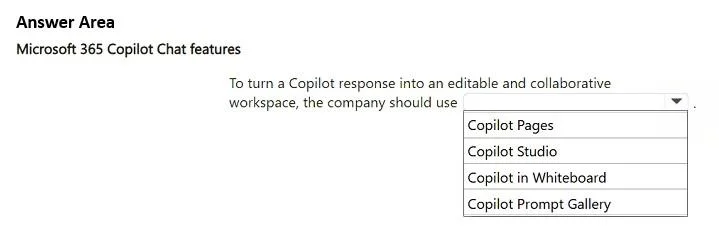
- To turn a Copilot response into an editable and collaborative workspace, the company should useCopilot PagesCopilot StudioCopilot in WhiteboardCopilot Prompt Gallery
Explanation
To transform a Microsoft 365 Copilot response into an editable and collaborative workspace, the correct feature to utilize is Copilot Pages, which leverages Microsoft Loop's capabilities.
Approach. The correct interaction is to select 'Copilot Pages' from the dropdown menu. Microsoft 365 Copilot can generate content that can be easily transformed into a Microsoft Loop page (often referred to in this context as 'Copilot Pages' or Loop components). Microsoft Loop is designed specifically for dynamic, collaborative, and editable workspaces, allowing teams to co-create and share content seamlessly across various Microsoft 365 applications. Therefore, turning a Copilot response into a 'Copilot Page' directly fulfills the requirement of creating an 'editable and collaborative workspace'.
Common mistakes.
- common_mistake. Selecting any option other than 'Copilot Pages' is incorrect because:
- Copilot Studio is a low-code platform for building custom copilots and generative AI experiences, not for transforming an existing Copilot Chat response into a collaborative document. It's for creating the AI assistant itself.
- Copilot in Whiteboard integrates Copilot with Microsoft Whiteboard for visual collaboration and brainstorming. While Whiteboard is collaborative, its primary purpose is visual ideation, not typically used to turn a text-based Copilot response into a general editable document or project workspace.
- Copilot Prompt Gallery is a collection of predefined prompts used to guide Copilot's output. It relates to the input given to Copilot, not how its output is managed or transformed into a workspace. The common mistake is not distinguishing between Copilot's core features, its development tools, and its specific integrations for different types of collaborative work.
Concept tested. Understanding the functionalities and integrations of Microsoft 365 Copilot, specifically how its output can be utilized in collaborative environments like Microsoft Loop. It tests knowledge of Microsoft Loop's role in creating flexible, portable, and collaborative workspaces, and its connection to Copilot's generated content.
Topics
Community Discussion
No community discussion yet for this question.