
MS-900 · Question #132
Hotspot Question An organization migrates to Microsoft 365. The company has an on-premises infrastructure that includes Exchange Server and Active Directory Domain Services. Client devices run…
The correct approach involves recognizing that Microsoft 365 user licenses cover Windows OS upgrade rights, desktop Office applications, and Exchange client access, but do not include Windows Server licenses.
Question
Exhibit
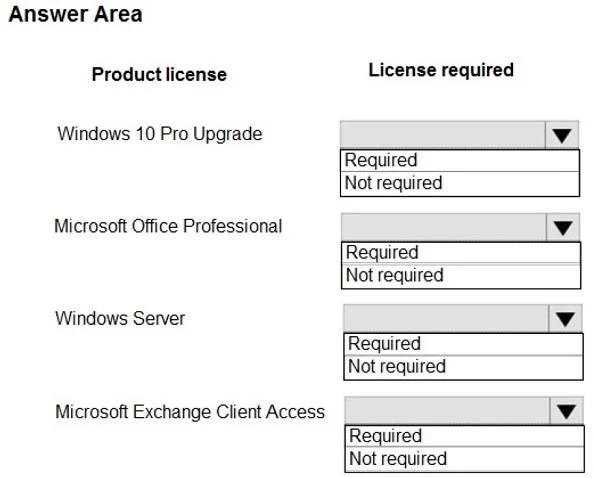
Answer Area
- Windows 10 Pro UpgradeRequiredNot required
- Microsoft Office ProfessionalRequiredNot required
- Windows ServerRequiredNot required
- Microsoft Exchange Client AccessRequiredNot required
Explanation
The correct approach involves recognizing that Microsoft 365 user licenses cover Windows OS upgrade rights, desktop Office applications, and Exchange client access, but do not include Windows Server licenses.
Approach. The scenario describes an organization migrating to Microsoft 365, with existing on-premises Exchange Server, Active Directory, and Windows 7 clients. The question asks which product licenses require purchase of Microsoft 365 licenses for new employees.
-
Windows 10 Pro Upgrade: Required
- Microsoft 365 Business Premium and Microsoft 365 Enterprise (E3/E5) licenses include upgrade rights from a qualifying Windows client OS (like Windows 7 Pro) to Windows 10/11 Enterprise edition. For a new employee, the M365 license provides the mechanism for them to get a current, licensed Windows OS. Therefore, the M365 license purchase is what covers the OS upgrade for new users.
-
Microsoft Office Professional: Required
- Microsoft 365 user subscription licenses (e.g., M365 Business Premium, M365 E3/E5) include the full desktop suite of Microsoft Office applications (Word, Excel, PowerPoint, Outlook, etc.). For new employees, the M365 license directly provides access to these essential productivity tools.
-
Windows Server: Not required
- Microsoft 365 user licenses are designed for client-side productivity, security, and device management. They do not include licenses for server operating systems like Windows Server. On-premises servers (e.g., for AD DS and existing Exchange Server) require separate Windows Server licenses, independent of the user's M365 subscription.
-
Microsoft Exchange Client Access: Required
- When new employees are onboarded with a Microsoft 365 license, they will typically be provisioned with Exchange Online mailboxes, which are a core component of M365 and covered by the user's subscription. In this case, no separate on-premises Exchange Client Access License (CAL) is needed. Even in a hybrid deployment where M365 users might still need to access on-premises Exchange resources, the M365 User Subscription License (which includes Exchange Online) generally provides the necessary equivalent CAL rights for accessing the on-premises Exchange server. Thus, the M365 license purchase is the mechanism for providing Exchange client access rights for new employees.
Common mistakes.
- common_mistake. A common mistake is incorrectly assuming what is included in a Microsoft 365 user subscription license (USL) and its interaction with on-premises components. For example:
- Windows 10 Pro Upgrade (Not required): This is wrong because M365 Business Premium and Enterprise SKUs specifically grant upgrade rights to Windows 10/11 Enterprise, making the M365 license the source of the OS license for new employees coming from Windows 7.
- Microsoft Office Professional (Not required): This is incorrect because desktop Office applications are a fundamental component of most M365 bundles.
- Windows Server (Required): This is wrong because M365 USLs are for users and client-side services, not for licensing server operating systems. Server licenses are distinct.
- Microsoft Exchange Client Access (Not required): This is incorrect because M365 licenses typically include Exchange Online and/or CAL equivalency for on-premises Exchange access in hybrid scenarios, meaning the M365 purchase does cover this functionality for new users.
Concept tested. Microsoft 365 licensing models, specifically the components included in common user subscription licenses (USLs) for M365 Business Premium or Enterprise (e.g., Windows OS upgrade rights, desktop Office applications, cloud services like Exchange Online, and CAL equivalencies for on-premises servers in hybrid scenarios). It tests the understanding of what a user's M365 license covers versus what still requires separate licensing.
Topics
Community Discussion
No community discussion yet for this question.