
MS-900 · Question #124
Hotspot Question You plan to deploy the Report Message add-in to Microsoft Outlook. For each of the following statements, select Yes if the statement is true. Otherwise, select No. How can you…
The correct answer is Use the Services & add-ins menu in the Microsoft 365 admin center to deploy the add-in. = Yes; Create a Microsoft Intune application policy to deploy the add-in. = No; Use Configuration Manager to deploy the add-in. = No. To deploy the Report Message add-in to Microsoft Outlook, administrators must use the Microsoft 365 admin center; Intune and Configuration Manager are not the correct tools for this purpose.
Question
Exhibit
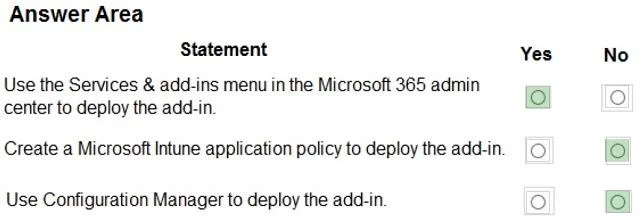
Answer Area
- Use the Services & add-ins menu in the Microsoft 365 admin center to deploy the add-in.Yes
- Create a Microsoft Intune application policy to deploy the add-in.No
- Use Configuration Manager to deploy the add-in.No
Explanation
To deploy the Report Message add-in to Microsoft Outlook, administrators must use the Microsoft 365 admin center; Intune and Configuration Manager are not the correct tools for this purpose.
Approach. The correct interaction is to select 'Yes' for the first statement and 'No' for the second and third statements.
-
'Use the Services & add-ins menu in the Microsoft 365 admin center to deploy the add-in.' - Select Yes.
- Reasoning: Organizational Outlook add-ins, including the 'Report Message' add-in, are deployed by administrators through the Microsoft 365 admin center. Specifically, for 'Report Message', it's often configured under 'Org settings' -> 'Services' -> 'Report Message', which then integrates with the Exchange Online environment to deploy the add-in manifest to user mailboxes. This is the standard and recommended method for centralized deployment of such add-ins.
-
'Create a Microsoft Intune application policy to deploy the add-in.' - Select No.
- Reasoning: Microsoft Intune (part of Microsoft Endpoint Manager) is primarily used for managing devices and deploying applications like Win32 apps, mobile apps (iOS/Android), and macOS apps. While Intune can deploy applications, it is not the mechanism for deploying Outlook add-in manifests that integrate with Exchange Online mailboxes. Outlook add-ins are managed through the M365 admin center or Exchange admin center, which pushes the add-in manifest directly.
-
'Use Configuration Manager to deploy the add-in.' - Select No.
- Reasoning: Microsoft Endpoint Configuration Manager (MECM, formerly SCCM) is an on-premises systems management product used for large-scale deployment of desktop applications, operating systems, and updates to client computers. Like Intune, it is not designed to deploy cloud-managed Outlook add-ins, which rely on manifest files pushed to user mailboxes via Exchange Online services.
Common mistakes.
- common_mistake. A common mistake would be to assume that all application deployments, including add-ins, can be handled by device management tools like Microsoft Intune or Configuration Manager. While these tools are essential for managing desktop applications and device policies, they are not the appropriate platform for deploying cloud-based Outlook add-ins that integrate directly with Microsoft 365 and Exchange Online mailboxes. Misunderstanding the specific capabilities and primary use cases of these different Microsoft management platforms leads to incorrect selections.
Concept tested. Deployment methods for Microsoft Outlook add-ins within a Microsoft 365 organizational environment, specifically distinguishing between centralized add-in management via the Microsoft 365 admin center/Exchange Online and traditional application deployment using Microsoft Intune or Configuration Manager.
Reference. https://learn.microsoft.com/en-us/microsoft-365/admin/manage/manage-deployment-of-add-ins
Topics
Community Discussion
No community discussion yet for this question.