
MS-721 · Question #250
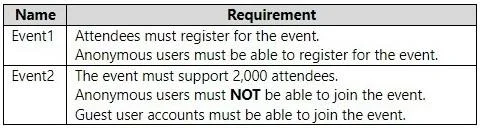
Drag and Drop Question You have a Microsoft Teams deployment. You plan to schedule the events shown in the following table. You need to recommend which type of event access to use for the events…
The correct answer is Public webinar; In-org town hall. The solution correctly matches 'Public webinar' to Event1 due to its registration and anonymous user requirements, and 'In-org town hall' to Event2 for its large attendee capacity and controlled access for authenticated users, excluding anonymous participants.
Question
Exhibit
Answer Area
Drag items
Correct arrangement
- Public webinar
- In-org town hall
Explanation
The solution correctly matches 'Public webinar' to Event1 due to its registration and anonymous user requirements, and 'In-org town hall' to Event2 for its large attendee capacity and controlled access for authenticated users, excluding anonymous participants.
Approach. To correctly answer the question, we must analyze the requirements for each event and match them to the capabilities of Microsoft Teams event types. The key differentiators are registration requirements, audience size limits, and access control (anonymous vs. in-organization/guest users).
-
Event1 Analysis:
- 'Attendees must register for the event.' - This is a primary feature of Teams Webinars. Town Halls typically don't require explicit registration through the Teams platform itself, though organizers can use external forms.
- 'Anonymous users must be able to register for the event.' - This specifically indicates a 'Public' event type, as 'In-org' events restrict registration/attendance to users within the organization or authenticated guests.
- Conclusion for Event1: Combining registration and public/anonymous access, 'Public webinar' is the correct choice.
-
Event2 Analysis:
- 'The event must support 2,000 attendees.' - Standard Teams Webinars support up to 1,000 attendees (or up to 10,000 with advanced licenses, but Town Halls are designed for even larger scale, easily accommodating 2,000). Teams Town Halls are built for large-scale broadcasts, supporting up to 10,000 or 20,000 attendees depending on licensing.
- 'Anonymous users MUST NOT be able to join the event.' - This rules out any 'Public' event type, as public events allow anonymous access. This means the event must be 'In-org'.
- 'Guest user accounts must be able to join the event.' - 'In-org' events, when configured correctly, allow authenticated guest users to join. This aligns with the 'In-org' access type.
- Conclusion for Event2: Given the large audience requirement (2,000) which favors Town Halls over Webinars, and the 'In-org' access type that supports guests but prohibits anonymous users, 'In-org town hall' is the correct choice.
Common mistakes.
- common_mistake. Several common mistakes could occur:
- Choosing 'In-org webinar' for Event1: This is incorrect because Event1 specifically requires anonymous users to be able to register. 'In-org' events restrict registration and access to users within the organization (and authenticated guests), not anonymous users.
- Choosing 'Public town hall' for Event1: While 'Public' allows anonymous access, Town Halls do not primarily focus on attendee registration as a core feature within Teams, unlike webinars. The explicit 'must register' requirement strongly points to a webinar.
- Choosing 'Public webinar' or 'Public town hall' for Event2: Both 'Public' options are incorrect for Event2 because it explicitly states 'Anonymous users MUST NOT be able to join the event'. Public events, by definition, allow anonymous access.
- Choosing 'In-org webinar' for Event2: While 'In-org webinar' satisfies the anonymous user restriction and guest access, the '2,000 attendees' requirement is a strong indicator for a Town Hall. Standard webinars are typically capped at 1,000 attendees, whereas Town Halls are designed for much larger audiences. Relying on potentially higher webinar limits from premium licenses might be a misinterpretation if the question implies standard capabilities. Town halls are the definitive choice for large-scale events.
Concept tested. The underlying technical concept being tested is the understanding of Microsoft Teams event types (Webinars vs. Town Halls, formerly Live Events) and their respective features, audience size limits, and access control mechanisms (Public vs. In-organization, and handling of anonymous vs. guest users). It requires knowing when to use each event type based on specific business requirements.
Topics
Community Discussion
No community discussion yet for this question.