
MS-721 · Question #246
Drag and Drop Question You have a Microsoft Teams Phone with Calling Plan deployment. You create an auto attendant named AutoAttend1 and associate AutoAttend1 to a resource account named IT Service…
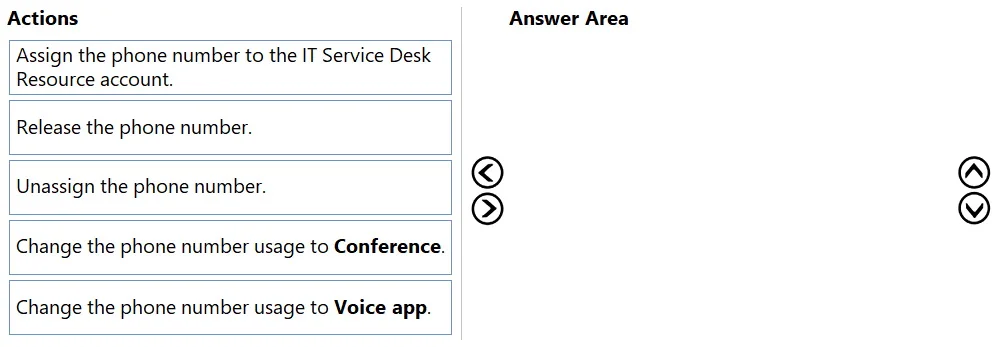
The correct answer is Unassign the phone number.; Assign the phone number to the IT Service Desk Resource account.; Change the phone number usage to Voice app. To assign an existing user's phone number to an Auto Attendant, it must first be unassigned from the user, then its usage type changed to 'Voice app', and finally assigned to the associated resource account.
Question
Exhibit
Answer Area
Drag items
Correct arrangement
- Unassign the phone number.
- Assign the phone number to the IT Service Desk Resource account.
- Change the phone number usage to Voice app.
Explanation
To assign an existing user's phone number to an Auto Attendant, it must first be unassigned from the user, then its usage type changed to 'Voice app', and finally assigned to the associated resource account.
Approach. The scenario requires assigning an existing phone number, currently allocated to a user, to an Auto Attendant (AutoAttend1) through its associated resource account (IT Service Desk). This involves a specific three-step sequence:
- Unassign the phone number: A phone number assigned to a user cannot be directly reassigned or have its usage changed while it's still linked to that user. Therefore, the first step is to 'Unassign the phone number' from the current user. This makes the number available for reallocation within the organization's inventory.
- Change the phone number usage to Voice app: Once unassigned from a user, the phone number's usage type needs to be updated to reflect its new purpose. Auto Attendants and Call Queues are classified as 'Voice apps' in Microsoft Teams. So, changing the usage to 'Voice app' prepares the number for assignment to an Auto Attendant's resource account.
- Assign the phone number to the IT Service Desk Resource account: With the phone number now unassigned from the user and correctly configured for 'Voice app' usage, it can be assigned to the 'IT Service Desk Resource account'. This resource account is associated with AutoAttend1, effectively linking the phone number to the Auto Attendant.
Therefore, the correct sequence of actions is: Unassign the phone number -> Change the phone number usage to Voice app -> Assign the phone number to the IT Service Desk Resource account.
Common mistakes.
- common_mistake. Common mistakes include selecting 'Release the phone number' instead of 'Unassign the phone number'. Releasing a phone number removes it from your organization's inventory and returns it to Microsoft, making it unavailable for use, which is not the goal here. Another mistake would be attempting to 'Assign the phone number to the IT Service Desk Resource account' directly without first unassigning it from the user and changing its usage type, as a number currently assigned to a user cannot be reassigned this way. Choosing 'Change the phone number usage to Conference' is incorrect because Auto Attendants are not conferencing services; 'Voice app' is the correct usage type for Auto Attendants.
Concept tested. The underlying technical concept being tested is Microsoft Teams Phone number management, specifically the lifecycle and assignment of phone numbers to different entities like users and Auto Attendants (via resource accounts). This includes understanding the need to unassign numbers from existing users, the different phone number usage types ('User', 'Voice app', 'Conference'), and the process of linking phone numbers to resource accounts for Auto Attendants and Call Queues.
Topics
Community Discussion
No community discussion yet for this question.