
MS-721 · Question #111
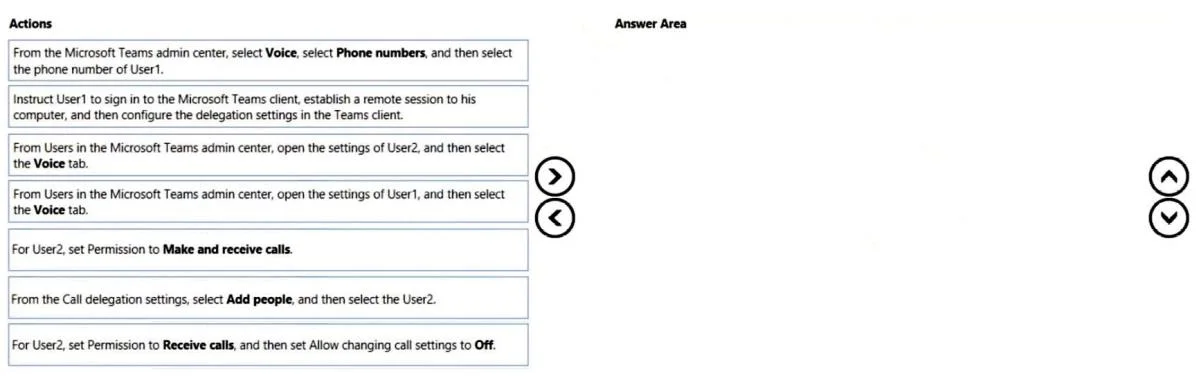
Drag and Drop Question You have two users named User1 and User2. You need to configure User2 as a call delegate for Uset1. The solution must meet the following requirements: - Minimize disruptions…
The correct answer is From Users in the Microsoft Teams admin center, open the settings of User1, and then select Call delegation.; From the Call Delegation settings, select Add people, and then select the User2.; For User2, set permission to Receive calls, and then set Allow changing call settings to Off. Configure User2 as a call delegate for User1 from the Microsoft Teams admin center, granting only receive call permissions and preventing User2 from modifying User1's settings.
Question
Exhibit
Answer Area
Drag items
Correct arrangement
- From Users in the Microsoft Teams admin center, open the settings of User1, and then select Call delegation.
- From the Call Delegation settings, select Add people, and then select the User2.
- For User2, set permission to Receive calls, and then set Allow changing call settings to Off.
Explanation
Configure User2 as a call delegate for User1 from the Microsoft Teams admin center, granting only receive call permissions and preventing User2 from modifying User1's settings.
Approach. The correct approach involves configuring call delegation from the Microsoft Teams admin center by an administrator, which meets the requirement to minimize disruption to User1. The actions must also ensure User2 cannot place calls for User1 or modify User1's settings.
- First Action: 'From Users in the Microsoft Teams admin center, open the settings of User1, and then select the Voice tab.' This is the initial step to access User1's specific call and delegation settings within the administrative portal.
- Second Action: 'From the Call delegation settings, select Add people, and then select the User2.' After navigating to User1's voice settings, the next logical step is to add User2 as a delegate through the dedicated delegation interface.
- Third Action: 'For User2, set Permission to Receive calls, and then set Allow changing call settings to Off.' This final action addresses the specific requirements: setting 'Receive calls' prevents User2 from placing calls on User1's behalf, and setting 'Allow changing call settings to Off' prevents User2 from modifying User1's settings. All actions are performed by an administrator, minimizing User1's involvement.
Common mistakes.
- common_mistake. - 'Instruct User1 to sign in...': This action requires User1's direct involvement, which violates the requirement to 'Minimize disruptions to User1'. Call delegation can and should be configured administratively.
- 'From Users in the Microsoft Teams admin center, open the settings of User2...': While User2 is the delegate, the delegation configuration (who User1 delegates calls to) is primarily managed from User1's settings, not User2's.
- 'For User2, set Permission to Make and receive calls': This option is incorrect because it explicitly allows User2 to place calls on behalf of User1, which contradicts the requirement to 'Prevent User2 from placing calls on behalf of User1'.
- 'From the Microsoft Teams admin center, select Voice, select Phone numbers...': This path is for managing phone numbers themselves, not for configuring individual user call delegation settings.
Concept tested. Microsoft Teams call delegation configuration, managing user voice settings in the Teams admin center, understanding delegate permissions (specifically 'Receive calls' versus 'Make and receive calls'), and the ability to prevent delegates from modifying delegator settings. It also tests an understanding of administrative best practices to minimize user disruption.
Topics
Community Discussion
No community discussion yet for this question.