
MS-721 · Question #109
Drag and Drop Question Your company has an on-premises deployment of Microsoft Skype for Business Server 2015 with CU8 that Is configured for hybrid connectivity. You are migrating to Microsoft…
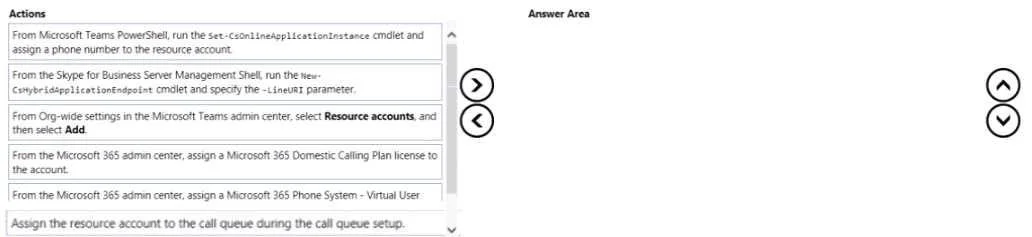
The correct answer is From On-premises settings in the Microsoft Teams admin center, select Resource accounts, and then add a resource account.; From the Microsoft Teams admin center, select Resource accounts, and then add a resource account for the call queue that will service users both on-premises and in the cloud.; From the Microsoft 365 admin center, assign a Microsoft 365 Domestic Calling Plan license to the resource account.; From the Microsoft 365 admin center, assign a Microsoft 365 Phone System - Virtual User license to the resource account. To create and assign a resource account for a hybrid Teams Call Queue with Direct Routing and AD-managed phone numbers, first establish the hybrid endpoint, then apply the correct license, and finally assign a phone number.
Question
Exhibit
Answer Area
Drag items
Correct arrangement
- From On-premises settings in the Microsoft Teams admin center, select Resource accounts, and then add a resource account.
- From the Microsoft Teams admin center, select Resource accounts, and then add a resource account for the call queue that will service users both on-premises and in the cloud.
- From the Microsoft 365 admin center, assign a Microsoft 365 Domestic Calling Plan license to the resource account.
- From the Microsoft 365 admin center, assign a Microsoft 365 Phone System - Virtual User license to the resource account.
Explanation
To create and assign a resource account for a hybrid Teams Call Queue with Direct Routing and AD-managed phone numbers, first establish the hybrid endpoint, then apply the correct license, and finally assign a phone number.
Approach. The correct sequence of three actions to create and assign a resource account for the call queue in this hybrid scenario is as follows:
-
'From the Skype for Business Server Management Shell, run the New-CsHybridApplicationEndpoint cmdlet and specify the -LyncURI parameter.'
- Reasoning: In a hybrid Skype for Business and Teams environment where phone numbers are managed in on-premises Active Directory, this is the crucial first step. The New-CsHybridApplicationEndpoint cmdlet creates an application endpoint object in the on-premises Skype for Business environment, complete with a LyncURI. This object represents the cloud-based resource account and is essential for establishing routing information from the on-premises environment to the cloud, ensuring that on-premises users can correctly route calls to the cloud call queue and that the AD-managed phone number can be properly associated.
-
'From the Microsoft 365 admin center, assign a Microsoft 365 Phone System - Virtual User' (assuming 'license to the account' is implied).
- Reasoning: After the resource account's hybrid identity is established and the account object is available in Microsoft 365 (either synced or created), it must be licensed to enable its Phone System capabilities. The 'Microsoft 365 Phone System - Virtual User' license is specifically required for Auto Attendants and Call Queues to function as Teams Phone System entities. Without this license, the account cannot be enabled for voice features.
-
'From Microsoft Teams PowerShell, run the Set-CsOnlineApplicationInstance cmdlet and assign a phone number to the resource account.'
- Reasoning: Once the resource account is properly provisioned and licensed for Phone System capabilities, the final step in making it functional is to assign a phone number to it. Since Direct Routing is used for PSTN connectivity, this number will be a Direct Routing number. The Set-CsOnlineApplicationInstance cmdlet is used in Teams PowerShell to assign this phone number to the online resource account, making the call queue reachable by callers.
Common mistakes.
- common_mistake. Several actions are incorrect or out of sequence:
- 'From Org-wide settings in the Microsoft Teams admin center, select Resource accounts and then select Add.': While this creates a resource account, it's typically used for cloud-only scenarios. In a hybrid setup where phone number assignments are performed in Active Directory, the 'New-CsHybridApplicationEndpoint' cmdlet is generally preferred as the initial step to correctly establish the hybrid identity and routing attributes in the on-premises directory, which then syncs.
- 'From the Microsoft 365 admin center, assign a Microsoft 365 Domestic Calling Plan license to the account.': This is incorrect. Resource accounts for Call Queues or Auto Attendants require a 'Microsoft 365 Phone System - Virtual User' license, not a Calling Plan license. Calling Plan licenses are for individual users who need to make/receive PSTN calls via a Microsoft Calling Plan, which is not applicable to resource accounts, especially when Direct Routing is in use.
- 'Assign the resource account to the call queue during the call queue setup.': This action is the final step of using the already created and configured resource account within the call queue, rather than being one of the initial three steps for creating and assigning the resource account itself. The question focuses on getting the resource account ready to be used, not the final association with the call queue.
Concept tested. Microsoft Teams Phone System resource account provisioning in a hybrid Skype for Business and Microsoft Teams environment, including hybrid endpoint configuration, licensing requirements for Call Queues, and assigning Direct Routing phone numbers via PowerShell.
Topics
Community Discussion
No community discussion yet for this question.