
MS-720 · Question #55
You have a Microsoft Teams Phone deployment. You are deploying Direct Routing. All users have a SIP URI in the format of [email protected]. The Session Border Controller (SBC) is named…
The correct answer is A. The certificate does not match the FQDN on the SBC. Option A is correct because Direct Routing requires the SBC's TLS certificate to have a Subject Name or Subject Alternative Name (SAN) that exactly matches the SBC's configured FQDN (sbc.voice.contoso.com). When Microsoft's infrastructure attempts the mutual TLS handshake and…
Question
Exhibit
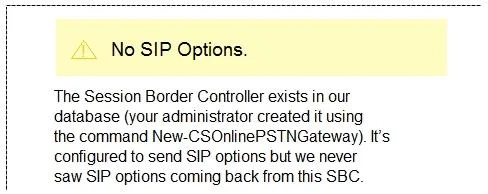
Options
- AThe certificate does not match the FQDN on the SBC.
- BThe firewall blocks inbound traffic on port 443 to the SBC.
- COnly TLS 1.0 is enabled on the SBC.
- DMicrosoft 365 Phone System licenses are not assigned to the users.
How the community answered
(39 responses)- A77% (30)
- B13% (5)
- C3% (1)
- D8% (3)
Explanation
Option A is correct because Direct Routing requires the SBC's TLS certificate to have a Subject Name or Subject Alternative Name (SAN) that exactly matches the SBC's configured FQDN (sbc.voice.contoso.com). When Microsoft's infrastructure attempts the mutual TLS handshake and the certificate name doesn't match, the SBC logs a certificate warning - precisely the kind of error shown in the exhibit.
Why the distractors are wrong:
- B is wrong because Direct Routing SIP signaling uses port 5061 (SIP/TLS), not 443; a blocked port would also cause a connection timeout, not a certificate warning.
- C is wrong because if only TLS 1.0 is enabled, the TLS handshake would fail entirely (Microsoft requires TLS 1.2+), producing a handshake failure - not a certificate mismatch warning.
- D is wrong because missing Phone System licenses affect individual users' ability to make calls, but have no bearing on the SBC's TLS session or the warnings it generates.
Memory tip: Think of the SBC certificate as its "name badge" - if the badge says the wrong name, Microsoft's security check rejects it at the door. Any time you see a certificate warning on an SBC, immediately verify that the cert's CN/SAN matches the exact FQDN configured in Teams Admin Center.
Topics
Community Discussion
No community discussion yet for this question.