
MS-720 · Question #53
Your company has a Microsoft Teams Phone deployment that uses Direct Routing and a single carrier. You deploy a new Session Border Controller (SBC) that shows as healthy in the Microsoft Teams admin…
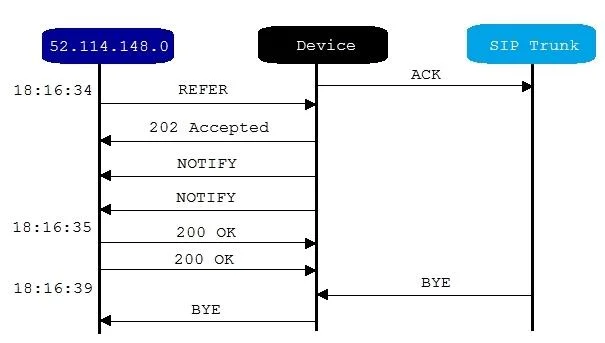
The correct answer is B. The Refer on the SBC is misconfigured. Call transfer in SIP relies on the REFER method - when you initiate a transfer in Teams, a REFER message is sent to the SBC instructing it to redirect the call. If the SBC's REFER handling is misconfigured (e.g., set to consume REFER locally instead of passing it to the…
Question
Exhibit
Options
- AThe SSL certificate of the SBC is incorrect.
- BThe Refer on the SBC is misconfigured.
- Cis enabled in the SIP options of the SBC.
- DThe carrier rejects the format of the forwarded FROM number.
How the community answered
(35 responses)- A9% (3)
- B83% (29)
- C6% (2)
- D3% (1)
Explanation
Call transfer in SIP relies on the REFER method - when you initiate a transfer in Teams, a REFER message is sent to the SBC instructing it to redirect the call. If the SBC's REFER handling is misconfigured (e.g., set to consume REFER locally instead of passing it to the carrier, or REFER support is disabled), the transfer will fail even though basic call setup works fine, which matches the described symptom exactly.
Why the distractors are wrong:
- A (SSL certificate): An incorrect certificate would prevent the SBC from establishing a secure SIP trunk at all - it would not show as healthy in the admin center, and no calls would succeed.
- C (SIP OPTIONS setting): SIP OPTIONS is used for SBC health-checking/keep-alives; a misconfiguration here would affect the healthy status shown in the admin center, not selectively break transfers.
- D (Carrier rejects FROM number format): A malformed FROM header would cause the carrier to reject the initial call setup, not just the subsequent transfer - the test call itself would have failed.
Memory tip: Think "REFER = transfer." Any time a question describes a scenario where calls complete successfully but transfer/redirect fails, immediately look for REFER-related misconfiguration on the SBC - it's almost always the culprit in Direct Routing setups.
Topics
Community Discussion
No community discussion yet for this question.