nerdexam
Microsoft

MB-800 · Question #80

Drag and Drop Question You work at a company that uses Dynamics 365 Business Central. You create an inventory period so that the accounting employees can post modifications to the inventory. Your…

The correct answer is Select the Adjust Cost - Item Entries action.; Select the Post Inventory to G/L action.; Access the Inventory Periods page. Closing an Inventory Period in Business Central - Explained The Core Logic The sequence follows a strict dependency chain: you cannot accurately post to the G/L until costs are adjusted, and you cannot safely close the period until the G/L is reconciled. --- Step-by-Step…

Inventory

Question

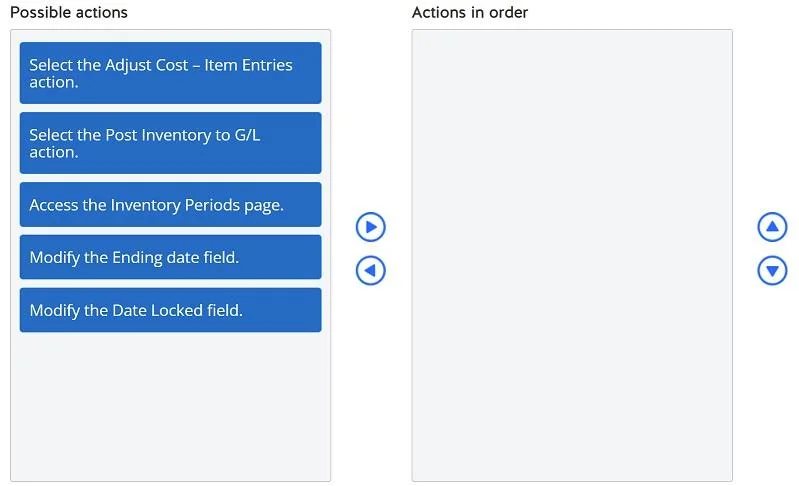
Drag and Drop Question You work at a company that uses Dynamics 365 Business Central. You create an inventory period so that the accounting employees can post modifications to the inventory. Your manager wants you to close the inventory period while making sure that all costs are posted to the general ledger. They also want to know if any items were adjusted during the inventory period. You need to close the inventory period in your company, taking into consideration the manager's requests. Which three actions should you perform in sequence? To answer, move the appropriate actions from the list of possible actions to the answer area and arrange them in the correct order. Answer:

Exhibit
MB-800 question #80 exhibit

Answer Area

Drag items

Select the Adjust Cost - Item Entries action.Select the Post Inventory to G/L action.Access the Inventory Periods page.Modify the Ending date field.Modify the Date Locked field.

Correct arrangement

  • Select the Adjust Cost - Item Entries action.
  • Select the Post Inventory to G/L action.
  • Access the Inventory Periods page.

Explanation

Closing an Inventory Period in Business Central - Explained

The Core Logic

The sequence follows a strict dependency chain: you cannot accurately post to the G/L until costs are adjusted, and you cannot safely close the period until the G/L is reconciled.


Step-by-Step Breakdown

Step 1 - Select the Adjust Cost - Item Entries action

This runs the cost adjustment process across all item ledger entries in the period. Business Central may have received inventory postings (receipts, sales, transfers) whose actual costs weren't fully resolved at the time of entry - particularly relevant for average-cost or FIFO items where costs depend on subsequent transactions.

  • Why first: All downstream steps depend on accurate costs. If you post to the G/L before adjusting costs, you'll post wrong values.
  • Addresses the manager's request: This step also reveals which items had costs adjusted during the period - giving the manager the visibility they asked for.

Step 2 - Select the Post Inventory to G/L action

This reconciles the inventory subledger with the General Ledger by creating G/L entries for any value entries not yet posted to finance.

  • Why second: Cost adjustment (Step 1) must be complete first. Running this before Step 1 leaves unadjusted costs out of the G/L, breaking financial reconciliation.
  • Addresses the manager's request: This fulfills the requirement that all costs are posted to the G/L before the period closes.

Step 3 - Access the Inventory Periods page

Now you navigate to the Inventory Periods page and use the Close Period action to lock the period against further posting.

  • Why last: Closing before Steps 1–2 would lock a period with incomplete or unreconciled costs, defeating the purpose of the close.

Why the Distractors Are Wrong

OptionWhy It's Excluded
Modify the Ending date fieldThe ending date is set when creating the period, not when closing it. Modifying it during close is not part of the standard process.
Modify the Date Locked fieldThis field is set automatically by the system when you execute the Close Period action - you don't manually edit it. Attempting to modify it directly is not the correct mechanism.

Common Mistakes

  1. Reversing Steps 1 and 2 - Posting to G/L before adjusting costs is the most common error. It posts stale values.
  2. Closing the period first - Trying to close before reconciling means the G/L may be out of sync and the period may not close cleanly.
  3. Thinking "Date Locked" is a manual step - It's a system-managed field, not a user action in the closing workflow.

Topics

#inventory periods#cost posting#adjust cost#general ledger

Community Discussion

No community discussion yet for this question.

Full MB-800 Practice