MB-800 · Question #286
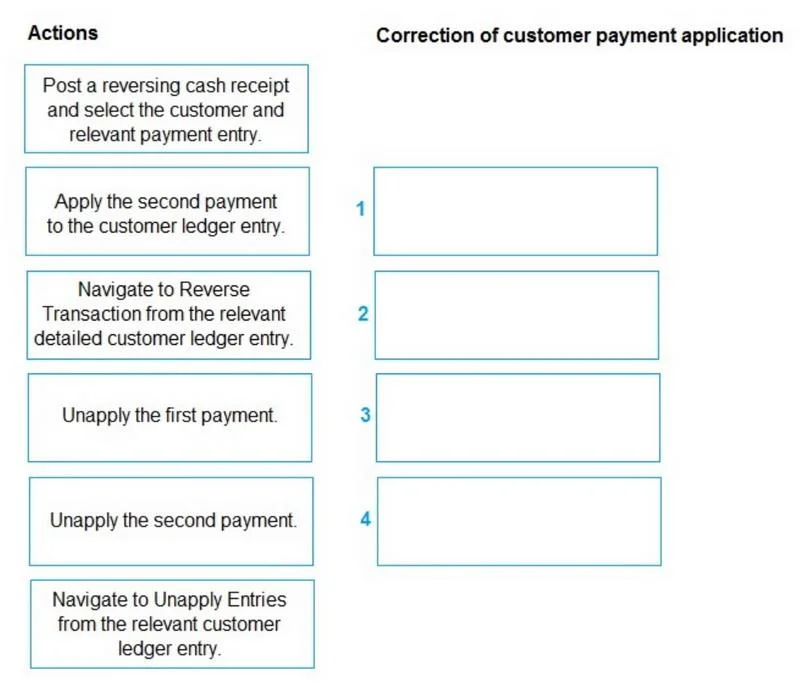
Drag and Drop Question A company uses Business Central. A user mistakenly partly applied two cash receipts to a posted sales transaction. You need to remove the first cash receipt from the posted…
The correct answer is Navigate to Unapply Entries from the relevant customer ledger entry.; Unapply the second payment.; Unapply the first payment.; Apply the second payment to the customer ledger entry. Business Central: Unapplying Cash Receipts - Explanation Core Concept: Why This Order Matters Business Central enforces LIFO (Last In, First Out) unapplication. You cannot remove an application that has another application layered on top of it. Think of it like stacking plates…
Question
Exhibit
Answer Area
Drag items
Correct arrangement
- Navigate to Unapply Entries from the relevant customer ledger entry.
- Unapply the second payment.
- Unapply the first payment.
- Apply the second payment to the customer ledger entry.
Explanation
Business Central: Unapplying Cash Receipts - Explanation
Core Concept: Why This Order Matters
Business Central enforces LIFO (Last In, First Out) unapplication. You cannot remove an application that has another application layered on top of it. Think of it like stacking plates - you must remove from the top down.
Step-by-Step Breakdown
Step 1: Navigate to Unapply Entries from the relevant customer ledger entry
Why first: This is the correct entry point. You locate the Customer Ledger Entry (the posted sales transaction) and access the "Unapply Entries" function from it. This opens a view of all applications linked to that entry, giving you the control surface for steps 2 and 3.
Distractor note: "Navigate to Reverse Transaction from the relevant detailed customer ledger entry" is wrong here - Reverse Transaction creates a full reversing posting, which is a heavier operation than unapplication. The question only asks to unapply, not reverse.
Step 2: Unapply the second payment
Why second: Even though the goal is to remove the first payment, BC's LIFO constraint requires removing the most recently applied entry first. The second payment is "on top" - you cannot touch the first until this is cleared.
Common mistake: Trying to unapply the first payment immediately. BC will block this with an error because a later application still references the same ledger entry.
Step 3: Unapply the first payment
Why third: Only now, with the second payment unapplied, is the first payment the "top" entry and eligible for unapplication. This step achieves the actual goal - removing the mistaken first cash receipt from the sales transaction.
Step 4: Apply the second payment to the customer ledger entry
Why last: The second payment was legitimate - it should remain applied. Unapplying it in step 2 was a necessary intermediate step, not the end state. You must re-apply it to restore the correct partial payment on the invoice.
Common mistake: Stopping after step 3 and forgetting to reapply the second payment, leaving the invoice showing more open balance than it should.
Why the Two Distractors Are Wrong
| Distractor | Why Excluded |
|---|---|
| Post a reversing cash receipt | Used to fully cancel a cash receipt posting - overkill; creates new G/L entries |
| Navigate to Reverse Transaction (detailed CLE) | Reverses the entire payment transaction; wrong scope for a targeted unapplication |
Summary Rule
Goal: Remove payment 1 only → You must unapply 2, unapply 1, re-apply 2. Never skip the re-application step.
Topics
Community Discussion
No community discussion yet for this question.