
Microsoft
MB-800 · Question #251
Drag and Drop Question You are implementing Business Central for a company. The finance manager of the company must configure the system to post payments and expenses. The configuration must include…
Sign in or unlock MB-800 to reveal the answer and full explanation for question #251. The question stem and answer options stay visible for context.
Financial management
Question
Drag and Drop Question You are implementing Business Central for a company. The finance manager of the company must configure the system to post payments and expenses. The configuration must include the following capabilities: - Get suggested payments to the external parties based on due dates and available funds. - Apply customer payments to multiple invoices. - Submit electronic payments to the bank. - Reimburse an employee to a dedicated bank account. You need to recommend the page the company should use for each requirement. Which page should you recommend posting to for each requirement? To answer, move the appropriate pages to the correct requirements. You may use each page once, more than once, or not at all. You may need to move the split bar between panes or scroll to view content. NOTE: Each correct selection is worth one point. Answer:
Exhibit
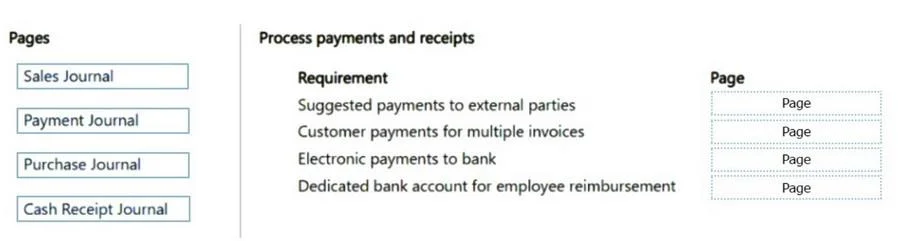
Answer Area
Drag items
Vendor posting groupsGeneral posting groupsCustomer posting groupsBank account posting groups
Unlock MB-800 to see the answer
You've previewed enough free MB-800 questions. Unlock MB-800 for full answers, explanations, the timed quiz mode, progress tracking, and the master PDF. Question stem and options stay visible so you can still see what's on the exam.
Topics
#payment journal#cash receipt journal#payment suggestions#employee reimbursement