nerdexam
Microsoft

MB-800 · Question #252

Drag and Drop Question You are implementing Dynamics 365 Business Central for a company. You set up the chart of accounts. The finance manager must map general ledger accounts to posting groups to…

The correct answer is General business posting groups; Customer posting groups; Tax/VAT business posting groups. Dynamics 365 Business Central - Posting Groups Explained Context The question asks which posting groups map entities (customers, vendors, items) to GL accounts. In Business Central, posting groups act as the bridge between transactions and the chart of accounts. The key is…

Configure financials

Question

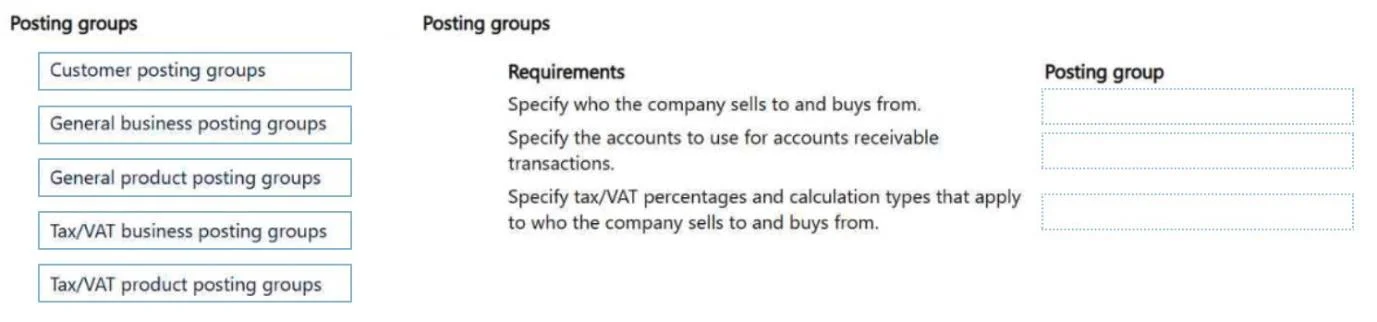
Drag and Drop Question You are implementing Dynamics 365 Business Central for a company. You set up the chart of accounts. The finance manager must map general ledger accounts to posting groups to automate transaction posting. You need to map entities to the general ledger accounts. Which posting groups should you set up? To answer, move the appropriate posting groups to the correct requirements. You may use each posting group once, more than once, or not at all. You may need to move the split bar between panes or scroll to view content. NOTE: Each correct selection is worth one point. Answer:

Exhibit
MB-800 question #252 exhibit

Answer Area

Drag items

Customer posting groupsGeneral business posting groupsGeneral product posting groupsTax/VAT business posting groupsTax/VAT product posting groups

Correct arrangement

  • General business posting groups
  • Customer posting groups
  • Tax/VAT business posting groups

Explanation

Dynamics 365 Business Central - Posting Groups Explained

Context

The question asks which posting groups map entities (customers, vendors, items) to GL accounts. In Business Central, posting groups act as the bridge between transactions and the chart of accounts. The key is understanding what each posting group is assigned to and what GL accounts it controls.


Why This Arrangement

The correct answers map to three distinct entity-level requirements. Without seeing the requirement labels, here is the standard exam framing:

SlotRequirementAnswer
1Map customer/vendor business type to revenue/expense GL accountsGeneral business posting groups
2Map customer entities to receivables/payables GL accountsCustomer posting groups
3Map customer/vendor business type to VAT/tax GL accountsTax/VAT business posting groups

Individual Placement Explanations

1. General Business Posting Groups Assigned to customers and vendors. They form one axis of the General Posting Setup matrix (Gen. Bus. Group × Gen. Prod. Group). That intersection determines which GL accounts receive sales/purchase revenue and COGS entries. This handles the "who are we selling to/buying from" side of the transaction.

2. Customer Posting Groups Assigned directly to individual customers. They define the Accounts Receivable GL account, payment discount accounts, and finance charge accounts for that customer group. This is the direct customer-entity-to-GL mapping - no matrix involved.

3. Tax/VAT Business Posting Groups Assigned to customers and vendors. They form one axis of the VAT Posting Setup matrix (VAT Bus. Group × VAT Prod. Group). That intersection determines the VAT account, VAT rate, and calculation method. This handles the "what is the tax treatment for this type of customer" side of the transaction.


Why the Others Were Not Selected

  • General product posting groups - assigned to items and GL accounts, not to customer/vendor entities. They are the product side of the General Posting Setup matrix.
  • Tax/VAT product posting groups - assigned to items, not entities. They are the product side of the VAT Posting Setup matrix.

Common Misconceptions

  1. Confusing General Business vs. Customer posting groups: Students often think Customer Posting Groups handle all customer-related GL mapping. In reality, Customer Posting Groups only handle AR/receivables accounts. Revenue accounts require the General Posting Setup matrix.

  2. Thinking product posting groups apply to customers: Product posting groups apply to items/services (the what), not customers/vendors (the who).

  3. Mixing up VAT and General posting group axes: Both have a Business and Product posting group, but they control completely separate things - revenue/expense vs. tax accounts.

Topics

#posting groups#chart of accounts#G/L mapping#transaction automation

Community Discussion

No community discussion yet for this question.

Full MB-800 Practice