nerdexam
Microsoft

MB-800 · Question #284

Drag and Drop Question A company uses Business Central. The finance manager requires the ability to delete zero balance general ledger (G/L) accounts. You need to configure the system. Which…

The correct answer is Check G/L Account Usage; Block Deletion of G/L Accounts; Check G/L Acc. Deletion After. Business Central: Deleting Zero Balance G/L Accounts This question tests your knowledge of the three deletion-control fields in General Ledger Setup (search "General Ledger Setup" in BC). Together, they form a gatekeeping chain - each setting acts at a different layer of the…

Configure financials

Question

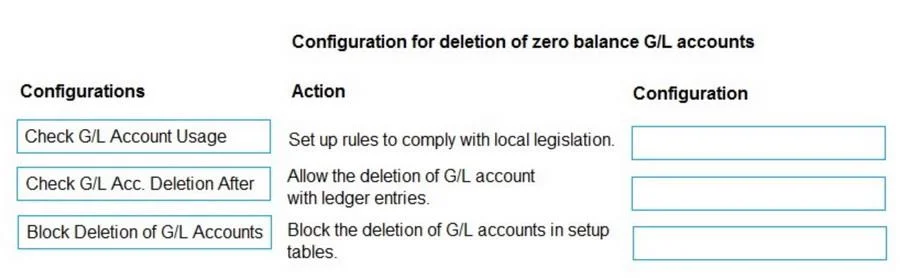
Drag and Drop Question A company uses Business Central. The finance manager requires the ability to delete zero balance general ledger (G/L) accounts. You need to configure the system. Which configuration should you use? To answer, move the appropriate configurations to the correct actions. You may use each configuration once, more than once, or not at all. You may need to move the split bar between panes or scroll to view content. NOTE: Each correct selection is worth one point. Answer:

Exhibit
MB-800 question #284 exhibit

Answer Area

Drag items

Check G/L Account UsageCheck G/L Acc. Deletion AfterBlock Deletion of G/L Accounts

Correct arrangement

  • Check G/L Account Usage
  • Block Deletion of G/L Accounts
  • Check G/L Acc. Deletion After

Explanation

Business Central: Deleting Zero Balance G/L Accounts

This question tests your knowledge of the three deletion-control fields in General Ledger Setup (search "General Ledger Setup" in BC). Together, they form a gatekeeping chain - each setting acts at a different layer of the deletion check.


The Three Settings Explained

1. Check G/L Account Usage (Position 1)

This toggle makes BC verify whether a G/L account is referenced in any setup tables (e.g., posting groups, account categories) before allowing deletion. It is the first check because it catches structural dependencies - an account wired into a posting group cannot be deleted regardless of its balance.

  • Enable it = BC refuses deletion if the account is used in configuration tables
  • You must resolve these references before deletion can proceed

2. Block Deletion of G/L Accounts (Position 2)

This is the master switch for deletion. When enabled, no G/L account can be deleted at all, period. For the finance manager to delete zero-balance accounts, this must be disabled (turned off).

  • This is the primary blocker most admins forget to check
  • Common mistake: people configure the date field (position 3) but leave this toggle ON, so deletion still fails

3. Check G/L Acc. Deletion After (Position 3)

A date field. If a G/L account has any posted entries dated after this date, deletion is blocked. To allow deletion of zero-balance accounts, set this date to an early enough date (or the company's go-live date) so that old accounts with no recent entries can be cleared.

  • This is a fine-grained control layered after the block toggle
  • Common mistake: leaving this blank or setting it to today's date, which inadvertently blocks everything

Why This Order Makes Sense

The three checks are hierarchical:

Structural usage check → Master deletion block → Date-based entry check

BC effectively runs them in this sequence. Resolving only one or two is insufficient - all three must be correctly configured for the finance manager to successfully delete a zero-balance account.


Key Misconception

Many candidates think only the date field (Check G/L Acc. Deletion After) matters. In practice, Block Deletion of G/L Accounts is the most common culprit when deletion silently fails, and it must be addressed alongside the other two.

Topics

#G/L accounts#zero balance deletion#chart of accounts#General Ledger Setup

Community Discussion

No community discussion yet for this question.

Full MB-800 Practice