MB-800 · Question #268
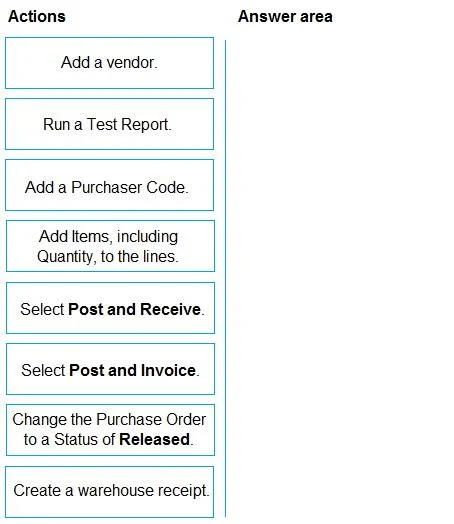
Drag and Drop Question You need to advise a company how to process a purchase order in the system for a company. Which four actions should you perform in sequence? To answer, move the appropriate…
The correct answer is Add a vendor.; Change the Purchase Order to a Status of Released.; Add Items, including Quantity, to the lines.; Select Post and Invoice. Purchase Order Processing - Exam Explanation This question is based on Microsoft Dynamics 365 Business Central (or a similar ERP). Here is a breakdown of the correct sequence and the reasoning behind each step. --- Correct Sequence 1. Add a vendor. The vendor (supplier) is…
Question
Exhibit
Answer Area
Drag items
Correct arrangement
- Add a vendor.
- Change the Purchase Order to a Status of Released.
- Add Items, including Quantity, to the lines.
- Select Post and Invoice.
Explanation
Purchase Order Processing - Exam Explanation
This question is based on Microsoft Dynamics 365 Business Central (or a similar ERP). Here is a breakdown of the correct sequence and the reasoning behind each step.
Correct Sequence
1. Add a vendor.
The vendor (supplier) is mandatory header-level information on a Purchase Order. Without it, the system has no party to purchase from, no payment terms, no currency, and no address. Everything else depends on this field being populated first.
Common mistake: Trying to add line items before completing the header. The system typically requires a valid vendor before lines can be entered.
2. Change the Purchase Order to a Status of Released.
Releasing the order signals that the header is confirmed and authorised. In Business Central, changing status to Released locks certain header fields and enables downstream processing (e.g., warehouse handling, approval workflows). The exam places this before posting.
Note / Common Misconception: In real-world Business Central workflows, items/lines are typically added before releasing the order. The exam's placement of this step at position 2 (before adding lines) is atypical and may reflect a simplified or abstracted test scenario. In practice, the sequence is usually: add vendor → add lines → release → post. Be aware this ordering may be a weakness in the exam question itself.
3. Add Items, including Quantity, to the lines.
The purchase order lines define what is being ordered and how much. Each line requires an item number and quantity at minimum. Unit cost and other fields may also be required. This populates the body of the order that will ultimately be received and invoiced.
Common mistake: Forgetting to enter quantities. Without a quantity, the posting step will either fail or post zero values, resulting in no inventory movement.
4. Select Post and Invoice.
This final action posts the purchase order, creating:
- A vendor ledger entry (the payable)
- Item ledger entries (inventory increase)
- General ledger entries (financial impact)
"Post and Invoice" combines receipt and invoicing into a single step. The alternative "Post and Receive" would only record goods received without creating the invoice - that would require a separate invoicing step afterward.
Common mistake: Choosing "Post and Receive" when the intent is to fully complete the transaction. Use "Post and Receive" only when you want to separate goods receipt from the vendor invoice (e.g., when the invoice arrives later).
Items Not Selected - Why They Were Excluded
| Item | Why excluded |
|---|---|
| Run a Test Report | A validation/preview tool, not a required processing step |
| Add a Purchaser Code | Optional field on the PO header, not mandatory |
| Select Post and Receive | Only records receipt; does not complete the full order cycle |
| Create a warehouse receipt | Only relevant when warehouse management is enabled; not part of basic PO flow |
Summary
The core flow is: identify supplier → configure order → add goods → complete financially. The main exam trap is distinguishing between "Post and Receive" (partial) vs. "Post and Invoice" (complete), and recognising that optional fields like Purchaser Code and Test Reports are distractors.
Topics
Community Discussion
No community discussion yet for this question.