nerdexam
Microsoft

MB-800 · Question #266

Drag and Drop Question A company is implementing Business Central. The company is evaluating Microsoft Power Platform integration benefits. The company has the following business requirements…

The correct answer is Power BI; Power Automate; Power Automate; Power Apps. Microsoft Power Platform - Business Central Integration Requirements to Tool Mapping | # | Business Requirement | Tool | |---|---|---| | 1 | Real-time financial reporting | Power BI | | 2 | Automate customer onboarding | Power Automate | | 3 | Automate invoice approvals | Power…

Set up Business Central

Question

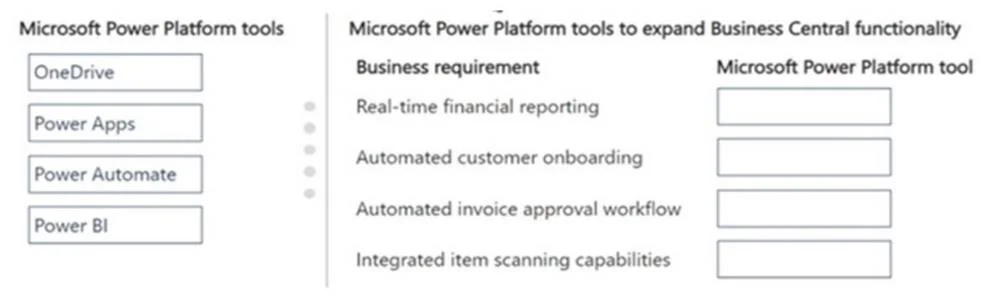
Drag and Drop Question A company is implementing Business Central. The company is evaluating Microsoft Power Platform integration benefits. The company has the following business requirements: - Provide financial reporting in real-time. - Automate customer onboarding in Business Central. - Create a workflow that automates invoice approvals. - Integrate item scanning capabilities in the warehouse. You need to evaluate the specified business requirements and align them with Microsoft solutions that can meet each need effectively. Which Microsoft Power Platform tools should you recommend? To answer, move the appropriate business Microsoft Power Platform tools to the correct requirements. You may use each Microsoft Power Platform tool once, more than once, or not at all. You may need to move the split bar between panes or scroll to view content. NOTE: Each correct selection is worth one point. Answer:

Exhibit
MB-800 question #266 exhibit

Answer Area

Drag items

OneDrivePower AppsPower AutomatePower BI

Correct arrangement

  • Power BI
  • Power Automate
  • Power Automate
  • Power Apps

Explanation

Microsoft Power Platform - Business Central Integration

Requirements to Tool Mapping

#Business RequirementTool
1Real-time financial reportingPower BI
2Automate customer onboardingPower Automate
3Automate invoice approvalsPower Automate
4Item scanning in warehousePower Apps

Placement Explanations

1. Real-time financial reporting → Power BI

Power BI is Microsoft's dedicated business analytics and data visualization platform. It connects natively to Business Central via a certified connector, enabling live dashboards and financial reports that refresh in real time. No other Power Platform tool is designed for this purpose - Power Apps can display data but is not a reporting/analytics engine.

2. Automate customer onboarding → Power Automate

Customer onboarding involves a sequence of triggered steps: creating records, sending welcome emails, provisioning access, notifying teams. Power Automate (formerly Microsoft Flow) is built exactly for multi-step process automation triggered by events (e.g., "new customer record created in Business Central"). It has pre-built Business Central connectors for this.

3. Automate invoice approval workflow → Power Automate

Invoice approval is a classic workflow automation scenario - route a document to an approver, wait for a response, then act on approval/rejection. Power Automate has a built-in Approvals action and direct Business Central connectors, making it the right tool. This is the same tool as #2 because both requirements describe workflow automation, and the question states tools can be used more than once.

4. Warehouse item scanning → Power Apps

Power Apps lets you build custom mobile applications without heavy development. It includes a native Barcode Scanner control, making it ideal for building a warehouse scanning app that runs on tablets/phones. Warehouse workers can scan items and interact with Business Central data through the app in real time.


Common Mistakes

  • Power Automate vs Power Apps confusion: Automate = workflows between systems; Apps = user-facing custom applications. Scanning requires a UI → Apps. Approval routing requires no custom UI → Automate.
  • OneDrive as a distractor: OneDrive is file cloud storage, not a Power Platform automation or analytics tool. It appears here to test whether you recognize it doesn't solve any of these requirements.
  • Power BI for onboarding/approvals: Power BI is read-only reporting. It cannot trigger actions or automate processes.
  • Using Power Apps for reporting: Power Apps can show data in a form/gallery but is not a substitute for Power BI's analytical, aggregation, and visualization capabilities.

Topics

#Power BI#Power Automate#Power Apps#Microsoft Power Platform

Community Discussion

No community discussion yet for this question.

Full MB-800 Practice