nerdexam
Microsoft

MB-800 · Question #256

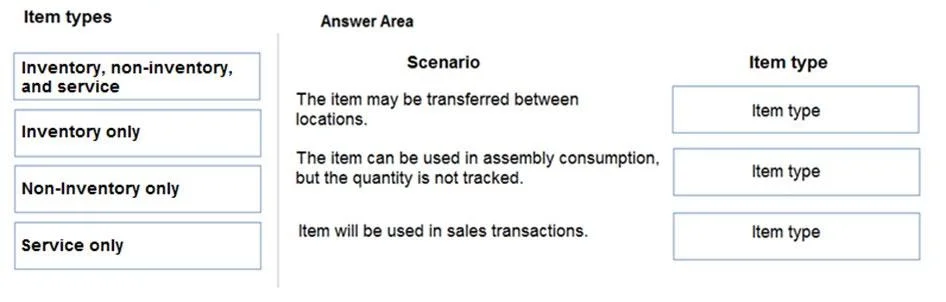
Drag and Drop Question You are configuring Dynamics 365 Business Central for a company. You need to create items. Which item types should you use? To answer, drag the appropriate item types to the…

The correct answer is Inventory only; Non-inventory only; Inventory, non-inventory, and service. Dynamics 365 Business Central: Item Types Explained > Note: The actual scenario descriptions (the left-side drop targets) weren't included in your question. The explanation below covers what each item type means and why the arrangement is correct, based on the standard MB-800…

Inventory

Question

Drag and Drop Question You are configuring Dynamics 365 Business Central for a company. You need to create items. Which item types should you use? To answer, drag the appropriate item types to the correct scenarios. Each item type may be used once, more than once, or not at all. You may need to drag the split bar between panes or scroll to view content. NOTE: Each correct selection is worth one point. Answer:

Exhibit
MB-800 question #256 exhibit

Answer Area

Drag items

Inventory, non-inventory, and serviceInventory onlyNon-inventory onlyService only

Correct arrangement

  • Inventory only
  • Non-inventory only
  • Inventory, non-inventory, and service

Explanation

Dynamics 365 Business Central: Item Types Explained

Note: The actual scenario descriptions (the left-side drop targets) weren't included in your question. The explanation below covers what each item type means and why the arrangement is correct, based on the standard MB-800 exam format for this question.


The Three Item Types in Business Central

TypeTracks Inventory Qty?Examples
InventoryYesFinished goods, raw materials, stocked parts
Non-InventoryNoOffice supplies, project materials not warehoused
ServiceNo (non-physical)Consulting hours, labor, maintenance

Why Each Placement Is Correct

Position 1 → Inventory only

Typically maps to a scenario like: "The company sells physical goods stored in a warehouse."

Technical reason: Only the Inventory type maintains quantity-on-hand, supports lot/serial number tracking, bin assignments, and affects inventory valuation entries (Item Ledger Entries). Non-inventory and service types do not post to inventory - selecting them here would break stock tracking.


Position 2 → Non-inventory only

Typically maps to: "The company purchases materials that are immediately consumed and not stored."

Technical reason: Non-Inventory items are bought and sold on documents but never create inventory ledger entries. They're ideal for supplies or pass-through costs. Using Inventory here would incorrectly inflate stock counts; using Service would be wrong because the item is still a physical good, just not stocked.


Position 3 → Inventory, Non-Inventory, and Service

Typically maps to: "Items that can be added to sales orders or purchase orders."

Technical reason: All three item types can appear on sales/purchase documents. Business Central does not restrict document lines by item type - this is a "none of these are excluded" scenario. All three post to G/L, just through different account paths.


Common Mistakes & Misconceptions

  • Confusing Non-Inventory with Service: Both skip inventory tracking, but Service is for intangible services (time/labor); Non-Inventory is for physical goods you just don't want to stock-track.
  • Thinking Service items can't be on purchase orders: They can - e.g., outsourced labor billed to you.
  • Assuming "Non-Inventory" means free: It still has a cost; it just doesn't hit the inventory account.
  • Using Inventory for everything: Only do this when stock quantity and valuation matter - over-using it adds unnecessary complexity (costing, adjustments, physical counts).

Topics

#item types#inventory items#service items#non-inventory items

Community Discussion

No community discussion yet for this question.

Full MB-800 Practice