
Microsoft
MB-800 · Question #239
Drag and Drop Question A manufacturer uses Dynamics 365 Business Central. The company has the following item types: - Raw Materials - Work-in-progress (WIP) - Finished Goods Different prefixes are…
Sign in or unlock MB-800 to reveal the answer and full explanation for question #239. The question stem and answer options stay visible for context.
Set up Business Central
Question
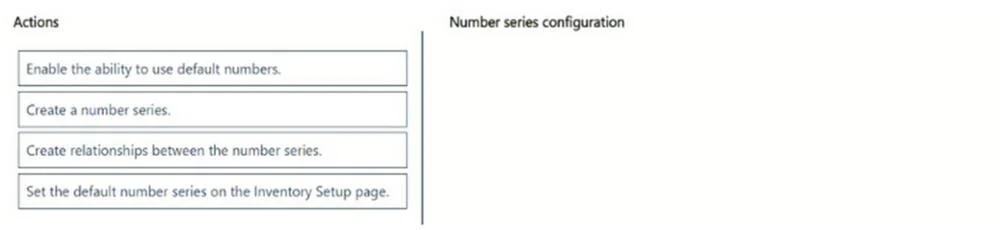
Drag and Drop Question A manufacturer uses Dynamics 365 Business Central. The company has the following item types: - Raw Materials - Work-in-progress (WIP) - Finished Goods Different prefixes are used for item numbers to identify these item types. The company requires the following system setup: - Use a unique number series for each item type. - No. Series must be selectable when creating manual items. - Implement automatic number assignment. You need to configure the system. In which order should you perform the actions? To answer, move all actions from the list of actions to the answer area and arrange them in the correct order. NOTE: More than one order of answer choices is correct. You will receive credit for any of the correct orders you select. Answer:
Exhibit
Answer Area
Drag items
Enable the ability to use default numbers.Create a number series.Create relationships between the number series.Set the default number series on the Inventory Setup page.
Unlock MB-800 to see the answer
You've previewed enough free MB-800 questions. Unlock MB-800 for full answers, explanations, the timed quiz mode, progress tracking, and the master PDF. Question stem and options stay visible so you can still see what's on the exam.
Topics
#number series#item numbering#automatic assignment#configuration sequence