
MB-800 · Question #153
Drag and Drop Question A company implements Dynamics 365 Business Central. The company must import the following opening balances into Dynamics 365 Business Central: - Item - Bank - Customer You…
The correct answer is Item journal; Bank account reconciliation; General journal. Dynamics 365 Business Central: Importing Opening Balances The Correct Mapping | Opening Balance | Component | |---|---| | Item | Item journal | | Bank | Bank account reconciliation | | Customer | General journal | --- Why Each Placement is Correct 1. Item → Item journal The…
Question
Exhibit
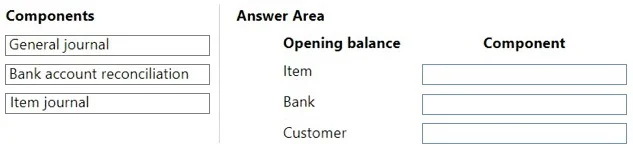
Answer Area
Drag items
Correct arrangement
- Item journal
- Bank account reconciliation
- General journal
Explanation
Dynamics 365 Business Central: Importing Opening Balances
The Correct Mapping
| Opening Balance | Component |
|---|---|
| Item | Item journal |
| Bank | Bank account reconciliation |
| Customer | General journal |
Why Each Placement is Correct
1. Item → Item journal
The Item journal is the dedicated tool for posting inventory-related transactions, including opening quantities and values for items. It posts directly to item ledger entries and the associated G/L accounts simultaneously. Using anything else (like the general journal) would not correctly update inventory quantity and valuation records - it would only affect G/L, leaving the item ledger out of sync.
2. Bank → Bank account reconciliation
Bank account reconciliation is used to establish opening bank balances by matching an initial statement balance against the bank ledger. This correctly initializes the bank account balance and ties it to the bank ledger entries. The general journal can post to bank accounts, but Bank account reconciliation is the proper tool specifically designed for this purpose in BC, especially when aligning with a real bank statement at go-live.
3. Customer → General journal
Customer opening balances are posted via the General journal using the Customer account type. This creates the initial open receivable entries in the customer ledger. There is no dedicated "Customer journal" in BC - the general journal serves as the entry point for AR/AP opening balances, posting to both the customer sub-ledger and the corresponding G/L receivables account.
Common Mistakes & Misconceptions
- Using General journal for Items: A very common mistake. The general journal does not update item ledger quantities - you must use the Item journal for inventory opening balances.
- Using General journal for Bank: Technically possible but incorrect for this scenario. The Bank account reconciliation is the expected/recommended tool and is the answer BC certification exams look for.
- Confusing Customer with Bank: Both are financial balances, but they use different tools. Bank gets reconciliation; Customer gets the general journal.
Topics
Community Discussion
No community discussion yet for this question.