
MB-800 · Question #149
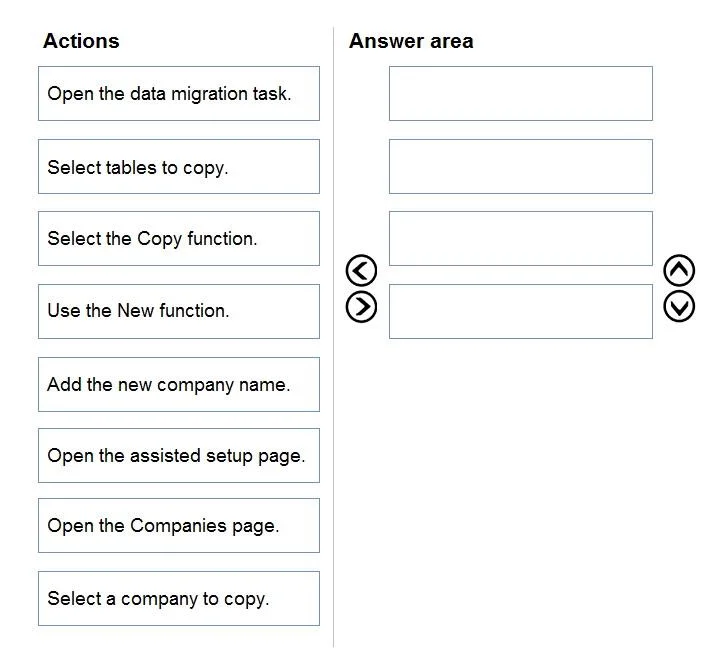
Drag and Drop Question A company uses Dynamics 365 Business Central. You need to duplicate a company based on the existing Dynamics 365 Business Central company. Which four actions should you…
The correct answer is Open the Companies page.; Select a company to copy.; Select the Copy function.; Add the new company name. Duplicating a Company in Dynamics 365 Business Central The Correct Sequence 1. Open the Companies page This is the mandatory entry point. Company management in Business Central is handled through the Companies list page (accessible via Settings > Companies or by searching…
Question
Exhibit
Answer Area
Drag items
Correct arrangement
- Open the Companies page.
- Select a company to copy.
- Select the Copy function.
- Add the new company name.
Explanation
Duplicating a Company in Dynamics 365 Business Central
The Correct Sequence
1. Open the Companies page
This is the mandatory entry point. Company management in Business Central is handled through the Companies list page (accessible via Settings > Companies or by searching "Companies"). You cannot access copy functionality without first navigating here - it's the administrative hub for all company-level operations.
2. Select a company to copy
You must highlight the source company before any copy action becomes available. The Copy function is context-sensitive - it acts on whichever company row is currently selected. Skipping this or selecting the wrong company means you'll duplicate the wrong data set.
3. Select the Copy function
With the source company selected, you invoke the Copy action from the ribbon/action bar. This opens a dialog that scaffolds the duplication process - it does not immediately create anything. It is triggered after selection because the UI only enables this action when a valid company is highlighted.
4. Add the new company name
Inside the Copy dialog, you provide the name for the destination company. Business Central uses this name to create the new company record and copies the source data into it. This is last because you can't name something that hasn't been initiated yet.
Why the Other Options Are Wrong
| Item | Why Excluded |
|---|---|
| Use the New function | Creates a blank company, not a copy - wrong tool for duplication |
| Open the assisted setup page | Used for guided onboarding/configuration, not company copying |
| Open the data migration task | For importing external data, not internal company duplication |
| Select tables to copy | This granular table selection is not part of the standard Company Copy wizard in Business Central |
Common Misconceptions
- "Use the New function" is the most common trap. Students confuse creating a company with duplicating one.
Newgives you a blank slate;Copyreplicates master data, setup tables, and configuration. - Assisted Setup sounds relevant but it's a post-creation configuration wizard, not a duplication mechanism.
- Some candidates expect a table-selection step - this exists in data migration tools, not the copy workflow. The Copy function transfers the full company configuration automatically.
Topics
Community Discussion
No community discussion yet for this question.