nerdexam
Microsoft

MB-800 · Question #137

Drag and Drop Question A company is implementing Dynamics 365 Business Central. You need to create posting details for the master data. Which setting should you use? To answer, drag the appropriate se

The correct answer is General Prod. Posting Group; General Bus. Posting Group; General Bus. Posting Group. Business Central: General Posting Groups on Master Data Context In Business Central, the General Posting Setup is a matrix that maps a Gen. Bus. Posting Group (the "who") × Gen. Prod. Posting Group (the "what") to specific G/L Accounts. Before that matrix works, each master data

Configure financials

Question

Drag and Drop Question A company is implementing Dynamics 365 Business Central. You need to create posting details for the master data. Which setting should you use? To answer, drag the appropriate settings to the correct requirements. Each setting may be used once, more than once, or not at all. You may need to drag the split bar between panes or scroll to view content. NOTE: Each correct selection is worth one point. Answer:

Exhibit
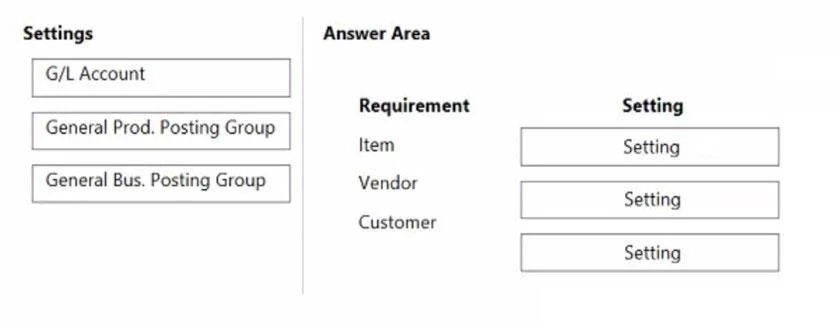
MB-800 question #137 exhibit

Answer Area

Drag items

G/L AccountGeneral Prod. Posting GroupGeneral Bus. Posting Group

Correct arrangement

  • General Prod. Posting Group
  • General Bus. Posting Group
  • General Bus. Posting Group

Explanation

Business Central: General Posting Groups on Master Data

Context

In Business Central, the General Posting Setup is a matrix that maps a Gen. Bus. Posting Group (the "who") × Gen. Prod. Posting Group (the "what") to specific G/L Accounts. Before that matrix works, each master data record must be assigned its appropriate group.

The three requirements (implied by the answer arrangement) are almost certainly:

#Requirement (Master Data)Correct Setting
1ItemsGeneral Prod. Posting Group
2CustomersGeneral Bus. Posting Group
3VendorsGeneral Bus. Posting Group

Placement Explanations

1. Items → General Prod. Posting Group

Items represent what is being bought or sold - the product side of a transaction. The Gen. Prod. Posting Group is assigned on the Item Card to classify the item type (e.g., Retail, Services, Raw Materials). This tells BC which row of the General Posting Setup matrix to use.

2. Customers → General Bus. Posting Group

Customers represent who you are selling to - a business relationship. The Gen. Bus. Posting Group on the Customer Card (e.g., Domestic, EU, Export) defines the column in the General Posting Setup matrix and drives which revenue/receivables accounts are hit.

3. Vendors → General Bus. Posting Group

Vendors are also a business party - who you buy from. Same logic as customers: the Gen. Bus. Posting Group on the Vendor Card classifies the vendor relationship and drives cost/payables accounts through the posting matrix.


Why G/L Account Is Not Used Here

G/L Account is a destination, not a classification tool for master data. It lives inside the General Posting Setup matrix itself (the result of combining Bus. + Prod. groups), not on Item/Customer/Vendor cards directly.


Common Misconceptions

  • Swapping Bus. and Prod. - The most frequent error. Remember: Bus. = the party (customer/vendor), Prod. = the thing (item/resource).
  • Assigning G/L Account to master data - G/L Accounts are assigned in the posting setup, not on the customer/vendor/item card as a "posting group."
  • Thinking vendors use Gen. Prod. Posting Group - Vendors are businesses, not products, so they always take the Bus. group.

Topics

#posting groups#master data#posting setup#G/L integration

Community Discussion

No community discussion yet for this question.

Full MB-800 Practice