nerdexam
Microsoft

MB-800 · Question #135

Drag and Drop Question A company uses Dynamics 365 Business Central. You assign a purchasing profile to all users in the purchasing department. A user moves from the purchasing department to another d

The correct answer is Open the User Settings card.; SelectUser Settings and then select the related link.; Navigate to the User Page Personalizations page.; Select the line for the page personalization that you want to delete and then select the Delete action.; Select Clear Personalized Pages.. Dynamics 365 Business Central: Removing User Personalizations Context When a user moves departments, you need to strip their old profile's personalizations. In Business Central, personalizations are stored per-user and can be cleared either individually (page by page) or all at o

Set up Business Central

Question

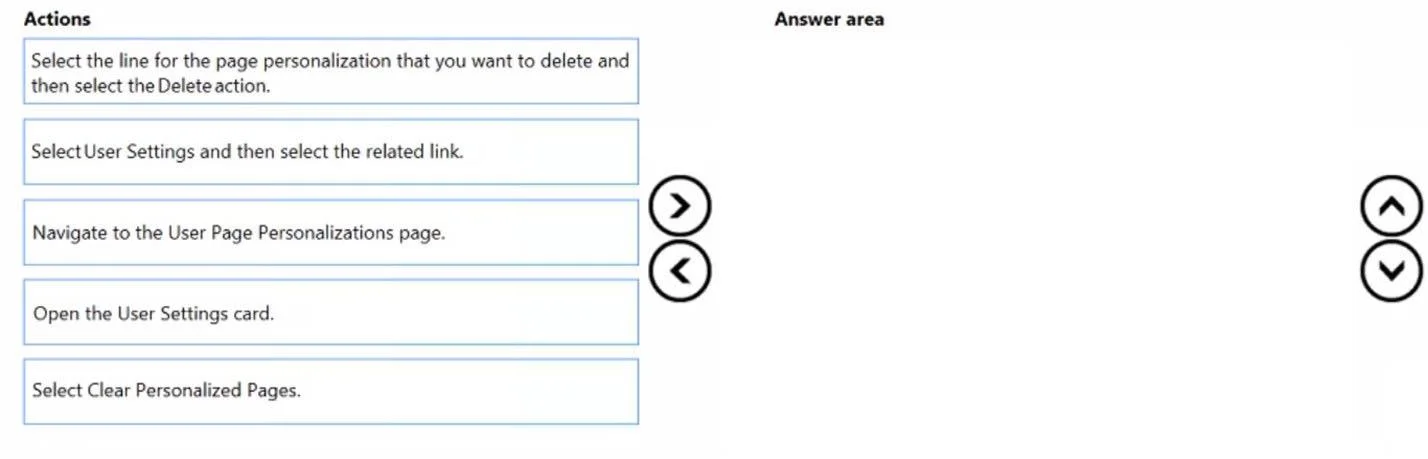
Drag and Drop Question A company uses Dynamics 365 Business Central. You assign a purchasing profile to all users in the purchasing department. A user moves from the purchasing department to another department. You need to remove all personalizations in the user's profile. Which three actions should you perform in sequence? To answer, move the appropriate actions from the list of actions to the answer area and arrange them in the correct order. Answer:

Exhibit
MB-800 question #135 exhibit

Answer Area

Drag items

Select the line for the page personalization that you want to delete and then select the Delete action.SelectUser Settings and then select the related link.Navigate to the User Page Personalizations page.Open the User Settings card.Select Clear Personalized Pages.

Correct arrangement

  • Open the User Settings card.
  • SelectUser Settings and then select the related link.
  • Navigate to the User Page Personalizations page.
  • Select the line for the page personalization that you want to delete and then select the Delete action.
  • Select Clear Personalized Pages.

Explanation

Dynamics 365 Business Central: Removing User Personalizations

Context

When a user moves departments, you need to strip their old profile's personalizations. In Business Central, personalizations are stored per-user and can be cleared either individually (page by page) or all at once. This question tests both paths - though note the discrepancy: the question says three actions but the answer key shows five, which suggests the exam may combine two distinct methods or is poorly scoped.


Why This Specific Order

Step 1: Open the User Settings card

Why first: This is the entry point. User-level settings and personalization links live on the User Settings card for a specific user. You cannot access any personalization management without first opening this record for the correct user. Skipping this means you're not operating in the right user's context.

Common mistake: Searching for "Personalizations" directly - there is no standalone global page you navigate to first. You always start from the user's record.


Step 2: Select User Settings and then select the related link

Why second: From inside the User Settings card, the Related menu exposes linked entities - including personalization records. This is the pivot step that bridges the user record to their page personalizations. The "related link" here takes you to the User Page Personalizations list filtered to that user.

Common mistake: Thinking "User Settings" in step 2 refers to a separate menu. It refers to the Related action within the card you already opened in step 1. These are chained actions on the same screen.


Step 3: Navigate to the User Page Personalizations page

Why third: After selecting the related link, you land on the User Page Personalizations list. This confirms you're viewing only this user's personalized pages - a prerequisite before selecting or deleting anything.

Common mistake: Treating steps 2 and 3 as the same step. Step 2 selects the link; step 3 confirms you're on the correct destination page. On the exam, they are distinct because one is an action and the other is a navigation result.


Step 4: Select the line for the page personalization you want to delete and then select Delete

Why fourth: This is the targeted deletion path - removing one specific page's personalization. You must be on the User Page Personalizations page (step 3) before you can select a line. Order matters because you can't select a record that isn't yet on screen.


Step 5: Select Clear Personalized Pages

Why fifth (or alternative to step 4): This is the bulk removal action - it wipes all personalizations for the user at once, which directly matches the scenario (user changed departments entirely). In practice, this is the most appropriate action for the described scenario.

Key misconception: Steps 4 and 5 are mutually exclusive paths, not sequential. The exam appears to conflate two workflows:

  • Targeted: Steps 1 → 2 → 3 → 4 (delete specific pages one by one)
  • Bulk: Steps 1 → 2 → 5 or Steps 1 → 3 → 5 (clear everything at once)

For the stated goal of removing all personalizations, Step 5 (Clear Personalized Pages) is the correct endpoint, not Step 4.


Bottom Line

The "three actions" the question likely intends are:

StepAction
1Open the User Settings card
2Select User Settings → Related link (to reach personalizations)
3Select Clear Personalized Pages

The full five-item sequence in the answer key describes an extended path that includes single-record deletion, which is a secondary method. On the exam, recognize that Clear Personalized Pages = bulk removal and is the right tool when a user leaves a department entirely.

Topics

#user profile#personalization#profile management#user configuration

Community Discussion

No community discussion yet for this question.

Full MB-800 Practice