
Microsoft
MB-800 · Question #10
Case Study 2 - Deliveries Current environment Deliveries The company receives daily truckloads of products from their vendors, warehouses the products briefly, and then ships orders based on a…
Sign in or unlock MB-800 to reveal the answer and full explanation for question #10. The question stem and answer options stay visible for context.
Purchasing
Question
Case Study 2 - Deliveries Current environment Deliveries The company receives daily truckloads of products from their vendors, warehouses the products briefly, and then ships orders based on a weekly delivery cycle to each customer's store. Customers have regular standing orders that are revised and finished one week prior to delivery. Best for You Organics has a fleet of trucks that make deliveries according to planned routes. The company also has a floating route for trucks to deliver rush orders. The route is being used more often by customers and has overwhelmed the warehouse with exception processing. Duties The company wants to provide greater separation of duties between activities in the office and activities in the warehouse. The accounting team enters orders for the sales team, sends pick tickers back to the warehouse, and organizes shipping documents. The accounting team invoices the orders when they receive instructions from the warehouse that an order shipped. Employees have expressed frustration because they need to work longer hours to accommodate the increase in sales. The company does not use the Advanced Warehousing function. Requirements Salespeople Salespeople must be able to manage opportunities that are converted to quotes. Salespeople must be able to release orders to the warehouse to be fulfilled once a quote is final. Salespeople must be trained on how to determine if inventory is available when they are completing the quote to avoid promising inventory that is not on hand because all orders are processed one week in advance of delivery. Team responsibilities Deliveries must be shipped daily by employees in the warehouse. The office must be responsible for completing the invoicing process. The current team responsibilities are shown in the following graphic: The required team responsibilities are shown in the following graphic: Vendor management The company contracts with each vendor for regular discounts at the invoice level. The company requires a pre-set discount percentage to calculate automatically when the purchaser completes a purchase order. The company must be able to see a copy of the completed purchase order in the system when they have new contract negotiations with their vendors. Customer and inventory management Sales invoices must be automatically emailed by the system to customers. A template must be used for emails sent to customers. The template must not be altered. Customers who pre-pay their invoices must not receive a copy of their invoices. The company warehouses all products as Case quantities. The company has difficulty recording accurate costs for product returns. The company wants to expand their capabilities for managing returns by setting up all inventory in a quantity of Each. Reporting The company must be able to answer two key questions when they report financial results: Which customers are buying which items? Which salespeople are selling in which regions? When discussing customers, the company must refer to each Customer Group as follows: Big Box Franchise Private When discussing items, the company must refer to each Item Group as follows: Fair Trade Free Range Grass Fed Heirloom Organic Salesperson names that must be used are: SalespersonA SalespersonB SalespersonC SalespersonD Region names that must be used are: North South East West Commission The company must be able to track salesperson performance within certain regions to calculate commission. Each salesperson must be assigned only to a single region. This commission data is currently recorded inconsistently, resulting in incorrect combinations that require manual correction. The company must have some level of automation to manage this. Issues Issue 1 The accounting team needs an improved process for reconciling inventory to the general ledger. Posted transactions are changing financial reporting in periods that have been closed. Unexpected changes in inventory cost for previous months are causing costing inaccuracies. The system must restrict the adjustment of costs for closed months. The new policy will be to restrict all users to posting in the current month only, with the exception of a few employees from the accounting team. The calendar fiscal year for company must begin on June 1. Issue 2 The accounting team uses a complex manual accrual process to determine the accounting impact of items received but not invoiced. The system must streamline the item accrual process. Issue 3 The company often receives a higher quantity of produce items than what they order because vendors allow for spoilage or damage of produce in transit. The company does not want to allow over receipt on non-produce items. Issue 4 The company has received comments from their auditors that invoices are not being properly compared to received inventory documents before they are posted. The company does not use warehouse management and always handles processes directly from the purchase order. The company always has the following documents: purchase order from the procurement department receiving document from the warehouse electronic invoice from the vendor Drag and Drop Question You need to configure the purchase order process for the company. Which four actions should you perform in sequence? To answer, move the appropriate actions from the list of actions to the answer area and arrange them in the correct order. Answer:
Exhibit
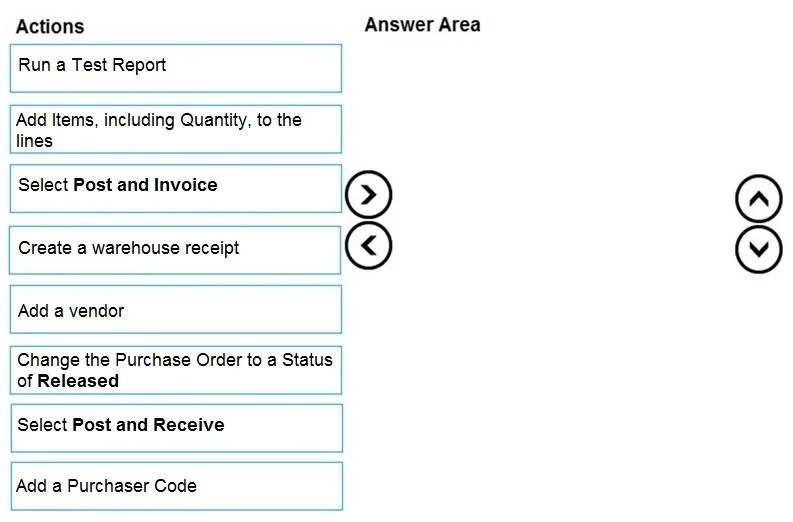
Answer Area
Drag items
Set Discount % on Vend. Invoice DiscountSet Calc. Inv. Discount to YesSet Calc. Discount on Purch. CostingSet Pmt. Disc. Excl. Tax to YesSet Calc. Inv. Discount to Yes on Purchase & Payables SetupSet Purch. Tax Incl. on Purch. & Payables SetupSelect Invoice discounts on Purchase & Payables SetupSet Adjust for Payment Disc. on General Ledger SetupSet Archive Orders to YesSet Archive Quotes to AlwaysSet Copy Comments Order to Invoice to YesSet a date for Now document Deletion Before
Unlock MB-800 to see the answer
You've previewed enough free MB-800 questions. Unlock MB-800 for full answers, explanations, the timed quiz mode, progress tracking, and the master PDF. Question stem and options stay visible so you can still see what's on the exam.
Topics
#purchase order process#three-way match#receiving#purchase setup