
Microsoft
MB-500 · Question #51
You are a Dynamics 365 Finance developer. Several users check out a custom form version control and modify the form. You need to find the user that has added a specific line of code to the form…
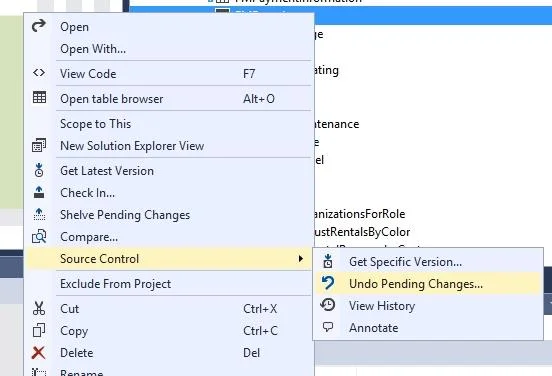
The correct answer is B. In Solution Explorer, navigate to the object and right-click View History. In Solution Explorer, right-click on the FMRental table, and select Source control > View History https://docs.microsoft.com/en-us/dynamics365/fin-ops-core/dev-itpro/dev-tools/version-control- metadata-navigation
Apply developer tools
Question
You are a Dynamics 365 Finance developer. Several users check out a custom form version control and modify the form. You need to find the user that has added a specific line of code to the form. What should you do?
Exhibit
Options
- AOpen the object in Object Designer, select the title of the object, and then right-click View History.
- BIn Solution Explorer, navigate to the object and right-click View History.
- CUsing Visual Studio, navigate to the object. Add the object to a new solution, and then right-click
- DUsing Visual Studio, navigate to the object in Application Explorer and right-click View History.
How the community answered
(34 responses)- A3% (1)
- B82% (28)
- C12% (4)
- D3% (1)
Explanation
In Solution Explorer, right-click on the FMRental table, and select Source control > View History https://docs.microsoft.com/en-us/dynamics365/fin-ops-core/dev-itpro/dev-tools/version-control- metadata-navigation
Topics
#version control#view history#Solution Explorer#source control
Community Discussion
No community discussion yet for this question.