
MB-500 · Question #321
Drag and Drop Question A company uses Dynamics 365 Finance. The company has a Main branch for all development and updates. The single Main branch creates issues when developers apply service updates…
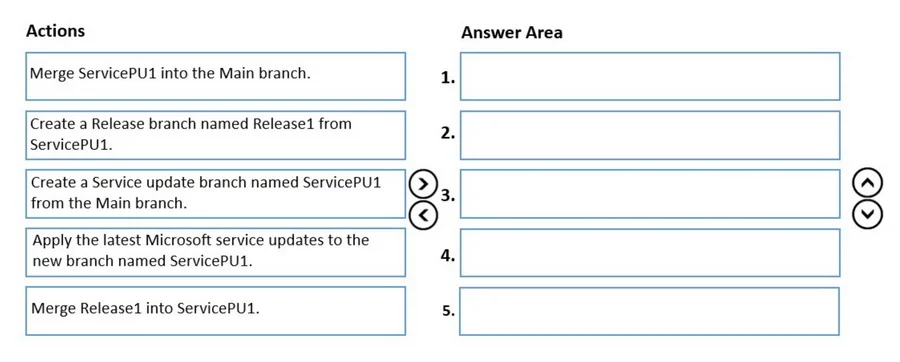
The correct answer is Create a Service update branch named ServicePU1 from the Main branch.; Apply the latest Microsoft service updates to the new branch named ServicePU1.; Create a Release branch named Release1 from ServicePU1.; Merge Release1 into ServicePU1.; Merge ServicePU1 into the Main branch. Branching Strategy for Dynamics 365 Finance - Explanation Context The problem: a single Main branch causes conflicts when service updates are applied during active development. The solution is isolation branching - creating dedicated branches so updates and releases don't…
Question
Exhibit
Answer Area
Drag items
Correct arrangement
- Create a Service update branch named ServicePU1 from the Main branch.
- Apply the latest Microsoft service updates to the new branch named ServicePU1.
- Create a Release branch named Release1 from ServicePU1.
- Merge Release1 into ServicePU1.
- Merge ServicePU1 into the Main branch.
Explanation
Branching Strategy for Dynamics 365 Finance - Explanation
Context
The problem: a single Main branch causes conflicts when service updates are applied during active development. The solution is isolation branching - creating dedicated branches so updates and releases don't interfere with each other.
Why This Order?
Step 1: Create a Service update branch named ServicePU1 from the Main branch.
You must branch off Main first because that is the stable, known-good baseline. This creates an isolated sandbox where Microsoft's service updates can be applied without touching Main or any in-progress developer work. You cannot apply updates to a branch that doesn't exist yet.
Step 2: Apply the latest Microsoft service updates to the new branch named ServicePU1.
Only after the branch exists can you apply updates to it. Updates are applied here - not on Main - so that if something breaks, it is fully contained. This is the entire purpose of the isolation branch.
Step 3: Create a Release branch named Release1 from ServicePU1.
Now that ServicePU1 contains the updated code, Release1 is branched from it (not from Main). This ensures Release1 is built on top of the service update baseline, not the old code. Branching Release1 from Main here would be wrong - it would miss the updates.
Step 4: Merge Release1 into ServicePU1.
Release-specific changes (bug fixes, customizations, release prep) made in Release1 are merged back into ServicePU1. This consolidates all work into one place before anything touches Main. Think of it as: finish your work in the release branch, then fold it into the update branch.
Step 5: Merge ServicePU1 into the Main branch.
Only at the end, once ServicePU1 contains both the Microsoft service update and the release changes, is everything merged back into Main. This is a single, validated merge - keeping Main stable throughout the entire process.
Common Mistakes / Misconceptions
| Mistake | Why It's Wrong |
|---|---|
Merging Release1 into Main directly | Main would get release changes but miss the service update context |
Creating Release1 from Main instead of ServicePU1 | The release branch wouldn't include the service updates |
Applying updates directly to Main | Defeats the purpose of isolation; breaks other developers' work |
Merging ServicePU1 into Main before Release1 is merged back | Release1 changes would be orphaned and lost from Main |
Mental Model
Think of it as a funnel: Main → ServicePU1 → Release1, then back up: Release1 → ServicePU1 → Main. You branch down to isolate, do work at each level, then merge back up in reverse order.
Topics
Community Discussion
No community discussion yet for this question.