MB-335 · Question #204
Drag and Drop Question A glass bottle manufacturer uses route operations to schedule resources and track manufacturing costs. The company has recently seen an increase in demand and purchases another
The correct answer is Create a new cost group.; Create a new cost category.; Assign the cost category to all route operations that use the new resource.. Explanation: Creating a Cost Category for a New Manufacturing Resource This question is from Microsoft Dynamics 365 Supply Chain Management and tests knowledge of how manufacturing costs are structured using cost groups, cost categories, and route operations. --- The Core Depende
Question
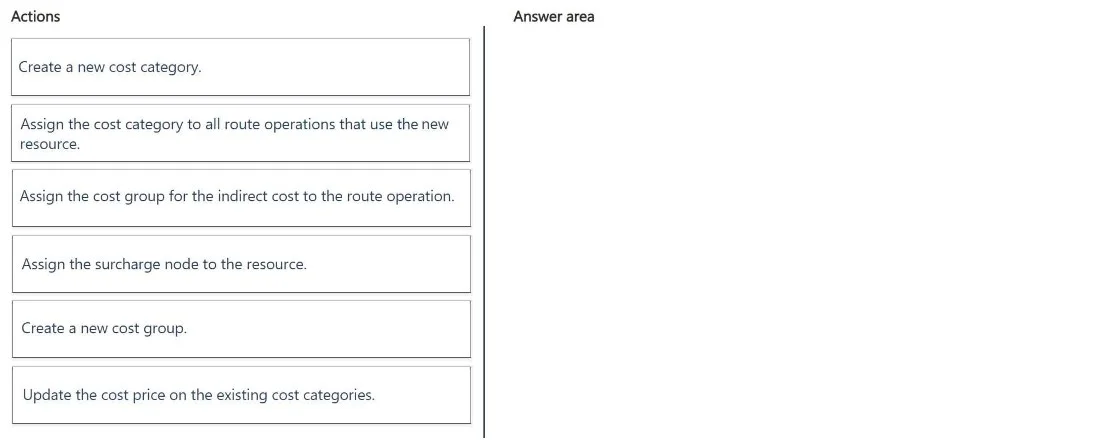
Drag and Drop Question A glass bottle manufacturer uses route operations to schedule resources and track manufacturing costs. The company has recently seen an increase in demand and purchases another resource that costs more to run. The company uses the same costs per resource. The company must be able to track cost contributions for the new resource. You need to create a cost category for the new resource. Which three actions should you perform in sequence? To answer, move the appropriate actions from the list of actions to the answer area and arrange them in the correct order. NOTE: More than one order of answer choices is correct. You will receive credit for any of the correct orders you select. Answer:
Exhibit
Answer Area
Drag items
Correct arrangement
- Create a new cost group.
- Create a new cost category.
- Assign the cost category to all route operations that use the new resource.
Explanation
Explanation: Creating a Cost Category for a New Manufacturing Resource
This question is from Microsoft Dynamics 365 Supply Chain Management and tests knowledge of how manufacturing costs are structured using cost groups, cost categories, and route operations.
The Core Dependency Chain
The three correct steps follow a strict technical dependency:
Cost Group → Cost Category → Route Operation Assignment
Each step is a prerequisite for the next. You cannot skip or reorder these without breaking the dependency.
Step-by-Step Breakdown
Step 1: Create a new cost group
A cost group is the top-level classification that enables cost segmentation and contribution tracking in cost rollups. In D365, a cost category must be assigned to a cost group - you cannot create a cost category without one.
More importantly, the requirement says the company "must be able to track cost contributions" for the new resource. Cost groups are exactly what enables this - they're what segregates costs in the cost breakdown view (e.g., material vs. labor vs. overhead by group). Using the existing cost group would blend the new resource's costs with existing ones, defeating the purpose.
Step 2: Create a new cost category
A cost category defines the cost rate applied to a route operation (e.g., $/hour for a machine or labor center). Since the new resource "costs more to run," it needs its own cost category with its own cost price - separate from the existing categories.
This step requires Step 1 to already exist because you must assign the new cost category to the new cost group during creation.
Step 3: Assign the cost category to all route operations that use the new resource
Route operations define the steps in the production process and which resource they consume. Assigning the new cost category to the relevant route operations links the new resource's cost rate into production cost calculations.
This must come last - you cannot assign something that doesn't yet exist.
Why the Other Items Are Wrong
| Item | Why it's excluded |
|---|---|
| Update cost price on existing cost categories | This changes costs for all resources sharing those categories - it doesn't isolate the new resource or enable separate tracking. |
| Assign the cost group for indirect cost to the route operation | This is for indirect/overhead costs (via a costing sheet), not for direct resource cost tracking. Wrong cost type entirely. |
| Assign the surcharge node to the resource | Surcharge nodes belong to indirect cost calculation sheets - a separate mechanism for overhead. Not applicable here. |
Common Mistakes
- Skipping the cost group: Candidates sometimes try to assign an existing cost group to a new cost category, assuming one group is enough. This works technically but defeats the tracking requirement - cost contributions will not be distinguishable.
- Going straight to the route operation: You cannot assign a cost category that doesn't exist yet. The creation steps must precede the assignment step.
- Confusing cost groups with cost categories: Cost groups = classification buckets for analysis. Cost categories = rate definitions applied to operations. They are not interchangeable.
The "Multiple Correct Orders" Note
The exam note acknowledges that in some implementations, Step 1 and Step 2 could be presented slightly differently in tools, but the logical dependency is fixed: the cost group must exist before the cost category references it. The only flexibility is minor UI variations - the sequence logic itself is not flexible.
Topics
Community Discussion
No community discussion yet for this question.
