MB-335 · Question #141
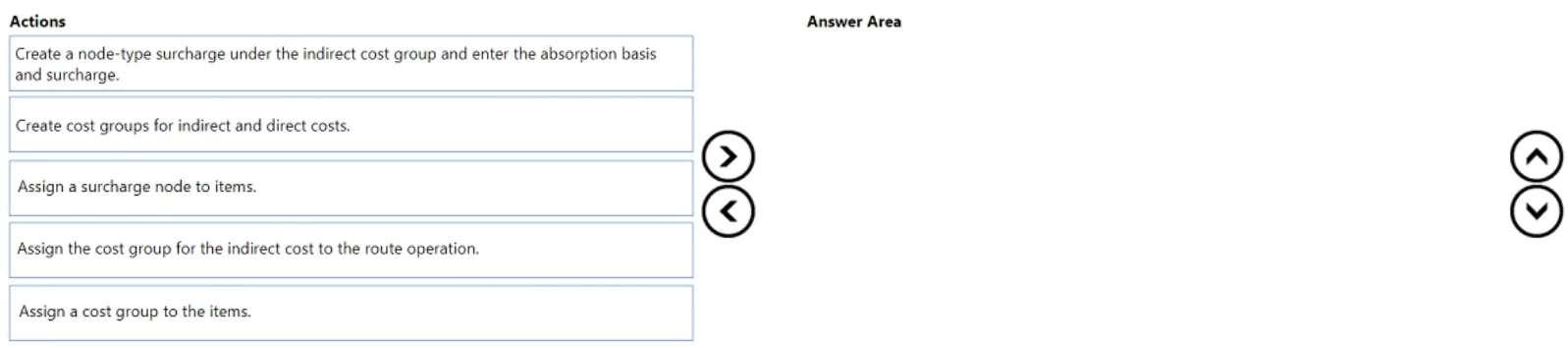
Drag and Drop Question A company plans to account for indirect costs related to materials used to manufacture products. The items used to manufacture products have surcharge rates that depend on the t
The correct answer is Create a node-type surcharge under the indirect cost group and enter the absorption basis and surcharge.; Assign a cost group to the items.; Assign a surcharge node to items.. Costing Sheet Surcharge Setup - Explained Context: This question is from Microsoft Dynamics 365 Finance & Supply Chain Management. It covers setting up a costing sheet to apply item-specific indirect cost surcharges during manufacturing cost calculations. --- Why This Sequence? T
Question
Exhibit
Answer Area
Drag items
Correct arrangement
- Create a node-type surcharge under the indirect cost group and enter the absorption basis and surcharge.
- Assign a cost group to the items.
- Assign a surcharge node to items.
Explanation
Costing Sheet Surcharge Setup - Explained
Context: This question is from Microsoft Dynamics 365 Finance & Supply Chain Management. It covers setting up a costing sheet to apply item-specific indirect cost surcharges during manufacturing cost calculations.
Why This Sequence?
The logic follows a strict define → categorize → link dependency chain. You cannot reference what doesn't exist yet.
Step-by-Step Breakdown
Step 1 - Create a node-type surcharge under the indirect cost group and enter the absorption basis and surcharge
Why first: This is the foundational definition step. The surcharge node must exist in the costing sheet before anything else can reference it. Here you define:
- The indirect cost group it belongs to
- The absorption basis (e.g., percentage of material cost)
- The actual surcharge rate
Dependency: Nothing can point to a surcharge node that hasn't been created yet.
Step 2 - Assign a cost group to the items
Why second: The question states surcharge rates depend on the type of product. Cost groups are the mechanism that categorizes items by type. Assigning a cost group to each item tells the costing sheet which cost category that item belongs to - which in turn determines which surcharge applies.
Dependency: Items must be categorized before they can be linked to a surcharge node, because the node-to-item association is made through this classification.
Step 3 - Assign a surcharge node to items
Why last: Now that the surcharge node exists (Step 1) and items have their cost group classification (Step 2), you can connect specific items to their applicable surcharge node. This is the final linkage that makes the costing sheet apply the correct indirect cost rate to the correct items.
Why the Other Options Are Wrong
| Option | Why Excluded |
|---|---|
| Assign cost group for indirect and direct costs | Too generic - not specific to item-level material surcharges |
| Assign cost group for indirect cost to route operation | Route operations relate to labor/machine overhead on work centers, not material-based item surcharges |
Common Mistakes
- Skipping Step 2 - Assuming you can assign a surcharge node directly to items without first classifying them via a cost group. The cost group is what makes item-type differentiation possible.
- Conflating route vs. item costs - Route operation cost groups control overhead on production operations; item cost groups control material-related surcharges. These are separate concepts.
- Reversing Steps 2 and 3 - You cannot assign a surcharge node to items that haven't been classified yet; the classification in Step 2 is a prerequisite for the assignment in Step 3.
Topics
Community Discussion
No community discussion yet for this question.