
MB-310 · Question #92
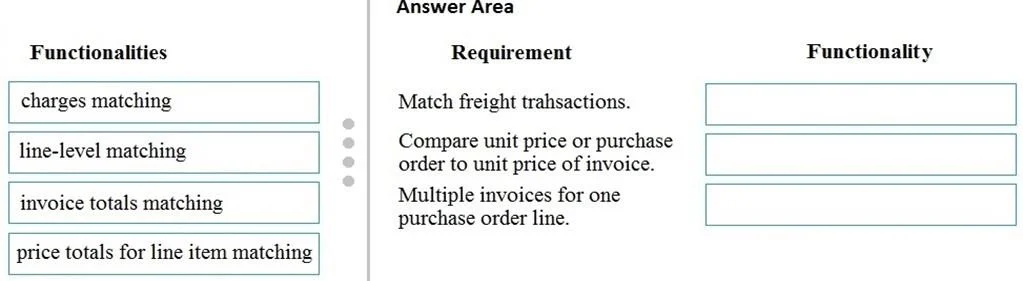
Drag and Drop Question A client wants to use Dynamics 365 Finance invoice validation functionality. You need to recommend the invoice validation functionality that meets their requirements. Which…
The correct answer is charges matching; line-level matching; invoice totals matching. Dynamics 365 Finance: Invoice Validation Matching Explained Since the requirement descriptions aren't shown in the question text, this is a standard MB-310/D365 Finance exam question. The three requirements are typically: | # | Requirement (implied) | Correct Functionality |…
Question
Exhibit
Answer Area
Drag items
Correct arrangement
- charges matching
- line-level matching
- invoice totals matching
Explanation
Dynamics 365 Finance: Invoice Validation Matching Explained
Since the requirement descriptions aren't shown in the question text, this is a standard MB-310/D365 Finance exam question. The three requirements are typically:
| # | Requirement (implied) | Correct Functionality |
|---|---|---|
| 1 | Verify miscellaneous charges (e.g., freight, handling fees) match between PO and vendor invoice | charges matching |
| 2 | Verify price and quantity on each individual line of the vendor invoice match the purchase order | line-level matching |
| 3 | Verify the overall totals on the vendor invoice match expected totals from the purchase order | invoice totals matching |
Individual Placement Explanations
1. Charges Matching
Why it fits: D365 Finance separates charges (freight, insurance, handling) from line items and invoice totals. Charges matching is a dedicated feature that specifically compares header- or line-level charges on the vendor invoice against charges recorded on the PO. Without this, a vendor could inflate freight costs without triggering a standard price mismatch.
2. Line-Level Matching (Two-Way / Three-Way)
Why it fits: This is the core matching engine in D365 Finance. It operates at the individual invoice line and compares:
- Two-way: Invoice line ↔ PO line (price + quantity)
- Three-way: Invoice line ↔ PO line ↔ Product receipt
This is the right tool when the requirement is about verifying per-line accuracy - not the overall total.
3. Invoice Totals Matching
Why it fits: This compares the aggregate totals of the entire invoice (net amount, total discount, sales tax, rounding) against the PO's expected totals. It catches discrepancies that wouldn't appear in line-level checks alone (e.g., a manipulated tax field).
Why "Price Totals for Line Item Matching" Is Not Used
Price totals matching is a more nuanced variant: it compares the cumulative extended price across all invoices posted against a single PO line (useful when a PO line is invoiced in multiple partial invoices). The requirements here don't describe a partial/cumulative invoice scenario, so this option is a distractor.
Common Mistakes
- Confusing line-level with invoice totals: Students often think "totals matching" covers everything. It does not - it only checks the header-level aggregate. Line-level matching is needed to catch per-line unit price or quantity errors.
- Overlooking charges matching: Charges live outside line items in D365 Finance's data model. Many candidates assume line-level matching covers freight/handling fees - it does not.
- Using "price totals for line item" for partial invoices: This option only becomes relevant in multi-invoice-against-one-PO-line scenarios. Don't apply it to standard single-invoice matching.
Topics
Community Discussion
No community discussion yet for this question.