
MB-310 · Question #90
Drag and Drop Question A company makes frequent payments to its vendors by using various due dates and discounts. You need to set up and create a vendor payment by using a payment proposal. In which…
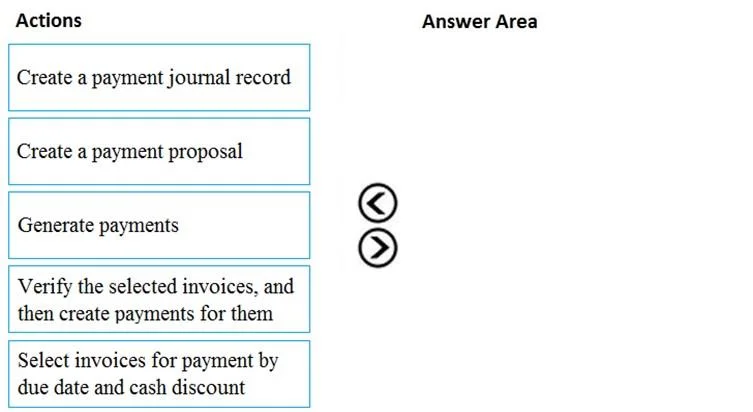
The correct answer is Create a payment journal record; Create a payment proposal; Select invoices for payment by due date and cash discount; Verify the selected invoices, and then create payments for them; Generate payments. Vendor Payment Proposal - Step-by-Step Explanation This question covers the Accounts Payable payment workflow in Microsoft Dynamics 365 Finance (or AX). The process follows a strict logical sequence: you must have a container before you can fill it, and you must review before…
Question
Exhibit
Answer Area
Drag items
Correct arrangement
- Create a payment journal record
- Create a payment proposal
- Select invoices for payment by due date and cash discount
- Verify the selected invoices, and then create payments for them
- Generate payments
Explanation
Vendor Payment Proposal - Step-by-Step Explanation
This question covers the Accounts Payable payment workflow in Microsoft Dynamics 365 Finance (or AX). The process follows a strict logical sequence: you must have a container before you can fill it, and you must review before you finalize.
Why This Order?
1. Create a payment journal record
Why first: The payment journal is the container for all payment activity. Nothing else can exist without it. Think of it as opening a ledger before you write anything in it. You select the journal type (e.g., Vendor payments) and give it a name/batch. No proposal, no invoices, no payments can be generated until this record exists.
Common mistake: Skipping this and trying to create a proposal directly - the system has nowhere to attach it.
2. Create a payment proposal
Why second: A payment proposal is a query/filter tool you run inside the journal. It tells the system "go look at open vendor invoices and bring back candidates based on criteria like due date, currency, and payment method." It doesn't select anything yet - it just sets up the parameters for selection.
Common mistake: Confusing the proposal with the actual payment. The proposal is the search setup, not the result.
3. Select invoices for payment by due date and cash discount
Why third: After the proposal runs its query, the system presents matching invoices. This step is where you apply filters - choosing which invoices fall within your due date window and which qualify for early-payment (cash) discounts. You are narrowing down the candidate list.
Common mistake: Thinking discounts are automatically applied without this step. You must explicitly evaluate and select based on discount criteria here.
4. Verify the selected invoices, and then create payments for them
Why fourth: Before committing anything, you review the proposed payment lines - amounts, vendors, dates, discount amounts. Once verified, the system converts the selected invoices into actual payment lines in the journal. This is a checkpoint step: catch errors before funds move.
Common mistake: Skipping verification and going straight to generation. Errors in vendor bank details or amounts are much harder to fix after generation.
5. Generate payments
Why last: This is the final execution step. It produces the actual payment output - whether that's an electronic file (ACH/EFT), check print, or SEPA transfer - and posts the journal, updating the vendor ledger and marking invoices as paid.
Common mistake: Treating "generate" as synonymous with "create." Generation only works correctly after all prior steps have validated the data. Running it early produces incomplete or erroneous payment files.
Key Mental Model
Journal → Proposal → Filter → Verify → Execute
Each step depends on the previous one existing. The workflow is deliberately sequential to enforce a review-before-payment control, which is an internal audit/accounting best practice (segregation of duties + approval gates).
Topics
Community Discussion
No community discussion yet for this question.