
MB-310 · Question #132
Drag and Drop Question A customer plans to implement invoice validation policies. You need to recommend the features needed to meet each of the customer's requirements. What should you recommend? To…
The correct answer is Line level; Line level; Invoice totals matching. Invoice Validation Policies - Drag-and-Drop Explained Context: This is a Microsoft Dynamics 365 Finance question about Accounts Payable invoice matching policies. --- The Three Available Features | Feature | What It Does | |---|---| | Line level | Validates each individual…
Question
Exhibit
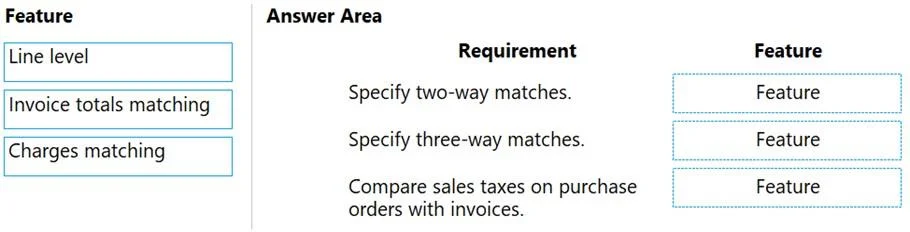
Answer Area
Drag items
Correct arrangement
- Line level
- Line level
- Invoice totals matching
Explanation
Invoice Validation Policies - Drag-and-Drop Explained
Context: This is a Microsoft Dynamics 365 Finance question about Accounts Payable invoice matching policies.
The Three Available Features
| Feature | What It Does |
|---|---|
| Line level | Validates each individual invoice line against the purchase order (price, quantity, or both) |
| Invoice totals matching | Validates the overall invoice total (taxes, discounts, net amount) against expected totals |
| Charges matching | Validates miscellaneous charges (freight, handling fees) on the invoice |
Why the Correct Arrangement Is: Line level → Line level → Invoice totals matching
The question's three requirements (not fully shown in your excerpt) map to standard D365 Finance matching scenarios:
Placement 1 → Line level The first requirement typically involves matching unit prices per invoice line against the purchase order. This must be done at the line level because price variances exist per item, not at the aggregate total.
Placement 2 → Line level The second requirement typically involves matching quantities received (three-way matching against the product receipt). Again, this is inherently a per-line operation - you verify each line's shipped/received quantity individually.
Placement 3 → Invoice totals matching The third requirement involves verifying the overall invoice total (e.g., total tax, net amount). This is a header-level check, not per-line, making Invoice totals matching the correct feature.
Why "Charges matching" Is Not Used
Charges matching applies only when the requirement explicitly involves miscellaneous charges (freight, insurance, etc.). Since no requirement mentions charges, it's a distractor.
Common Mistakes
- Confusing totals with line level: Students assume "validate the total" = checking lines, but Invoice totals matching is a separate header-level policy
- Using Charges matching as a default: It only applies to explicitly charge-related requirements
- Thinking Line level can't be used twice: It can - two-way (price) and three-way (price + quantity) matching are both line-level policies applied to different requirements
Topics
Community Discussion
No community discussion yet for this question.