
MB-310 · Question #88
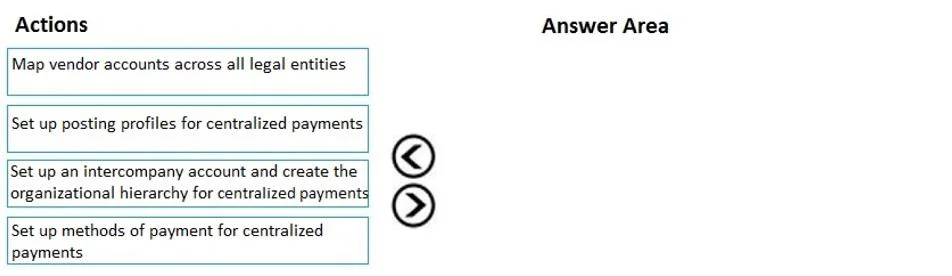
Drag and Drop Question You are a Dynamics 365 Finance functional consultant. A legal entity processes and settles vendor payments on behalf of other legal entities in an organization. You need to…
The correct answer is Set up an intercompany account and create the organizational hierarchy for centralized payments; Map vendor accounts across all legal entities; Set up posting profiles for centralized payments; Set up methods of payment for centralized payments. Centralized Payments Configuration Order - Explained Why This Order? The sequence follows a strict dependency chain: each step creates the foundation the next step requires. You cannot configure behavior before you configure the structure it depends on. --- Step-by-Step…
Question
Exhibit
Answer Area
Drag items
Correct arrangement
- Set up an intercompany account and create the organizational hierarchy for centralized payments
- Map vendor accounts across all legal entities
- Set up posting profiles for centralized payments
- Set up methods of payment for centralized payments
Explanation
Centralized Payments Configuration Order - Explained
Why This Order?
The sequence follows a strict dependency chain: each step creates the foundation the next step requires. You cannot configure behavior before you configure the structure it depends on.
Step-by-Step Breakdown
1. Set up an intercompany account and create the organizational hierarchy for centralized payments
This is the structural prerequisite for everything else. The intercompany accounts define how money flows between legal entities in the general ledger, and the organizational hierarchy designates which legal entity is the "central" payer. Without this, the system has no framework within which vendors, profiles, or methods can operate in a cross-entity context. You are essentially telling Dynamics 365: "these legal entities are related, and this one pays on behalf of the others."
2. Map vendor accounts across all legal entities
Once the hierarchy exists, you map the same vendor across multiple legal entities so the system knows that "Vendor A in Entity 1" is the same as "Vendor A in Entity 2." This cross-entity vendor mapping is required before posting profiles can be meaningful - you need to know whose transactions you're posting. Doing this before profiles avoids orphaned or incorrect ledger entries.
3. Set up posting profiles for centralized payments
With the hierarchy established and vendors mapped, you now configure how transactions are posted to the general ledger - which accounts receive the debit/credit for the paying entity vs. the transacting entity. Posting profiles depend on having vendors mapped because the profiles govern behavior for those vendors. Setting profiles before mapping vendors would mean configuring rules for entities that aren't yet linked.
4. Set up methods of payment for centralized payments
This is the final, operational layer - defining how the payment is actually made (check, EFT, wire, etc.) and which bank account or offset account is used. Methods of payment reference the posting profiles set up in step 3, so they must come last. The payment method is the execution mechanism; it assumes all the structural and accounting configuration is already in place.
Common Mistakes / Misconceptions
- Skipping or reversing steps 1 and 2: Many candidates assume vendor mapping is a prerequisite for the hierarchy, but it's the opposite - the hierarchy provides the context in which vendor mapping is meaningful.
- Confusing posting profiles with methods of payment: Posting profiles define where amounts land in the ledger; methods of payment define how the payment is transmitted. They are distinct and posting profiles must precede payment methods.
- Treating any step as optional: In Dynamics 365 Finance, centralized payments will not function correctly if the hierarchy isn't established first - the other steps simply won't behave as expected without that anchor.
Topics
Community Discussion
No community discussion yet for this question.