
MB-310 · Question #93
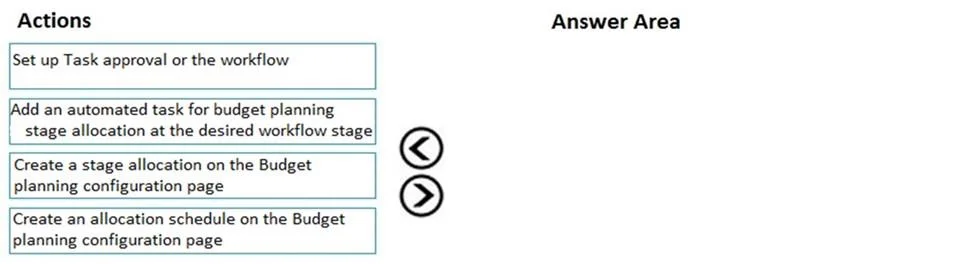
Drag and Drop Question You are creating a budget for an organization. The organization requires that allocations be performed automatically as part of budget planning. You need to invoke allocations…
The correct answer is Set up Task approval or the workflow; Create an allocation schedule on the Budget planning configuration page; Add an automated task for budget planning stage allocations at the desired workflow stage. Budget Planning: Automated Allocations - Sequence Explanation This question is from Microsoft Dynamics 365 Finance (Budget Planning module). The goal is to wire up automatic allocations that fire at a specific workflow stage. --- Why This Specific Order The sequence follows a…
Question
Exhibit
Answer Area
Drag items
Correct arrangement
- Set up Task approval or the workflow
- Create an allocation schedule on the Budget planning configuration page
- Add an automated task for budget planning stage allocations at the desired workflow stage
Explanation
Budget Planning: Automated Allocations - Sequence Explanation
This question is from Microsoft Dynamics 365 Finance (Budget Planning module). The goal is to wire up automatic allocations that fire at a specific workflow stage.
Why This Specific Order
The sequence follows a dependency chain: you can't configure what doesn't exist yet.
Step-by-Step Breakdown
1. Set up Task approval or the workflow
The workflow is the container for all budget planning stages and tasks. It must exist before anything can be added to it. Think of it as building the pipeline before laying anything inside it. Without a workflow, there is no "stage" to attach an automated task to.
2. Create an allocation schedule on the Budget planning configuration page
An allocation schedule defines how the allocation works - source accounts, destination accounts, allocation method (percentage, fixed amount, etc.). This must be created before it can be referenced. It is the reusable rule that the automated task will invoke.
3. Add an automated task for budget planning stage allocations at the desired workflow stage
Only now - with both a workflow (Step 1) and an allocation schedule (Step 2) in place - can you insert an automated task into the workflow at the correct stage. The task binds the allocation schedule to the workflow stage, making it fire automatically.
The Distractor: "Create a stage allocation on the Budget planning configuration page"
This is the trap answer. The correct configuration object is an allocation schedule, not a "stage allocation." These sound similar but serve different purposes. Stage allocations are a separate concept and are not the mechanism for automated workflow-triggered allocations. Choosing this would leave you with no schedule for the automated task to reference.
Common Mistakes
| Mistake | Why It's Wrong |
|---|---|
| Adding the automated task before creating the workflow | No workflow = no stage to attach the task to |
| Choosing "stage allocation" instead of "allocation schedule" | Wrong configuration object; won't hook into workflow automation |
| Creating the allocation schedule before the workflow | Technically harmless, but on exams the workflow is considered the prerequisite foundation |
Topics
Community Discussion
No community discussion yet for this question.