
MB-310 · Question #338
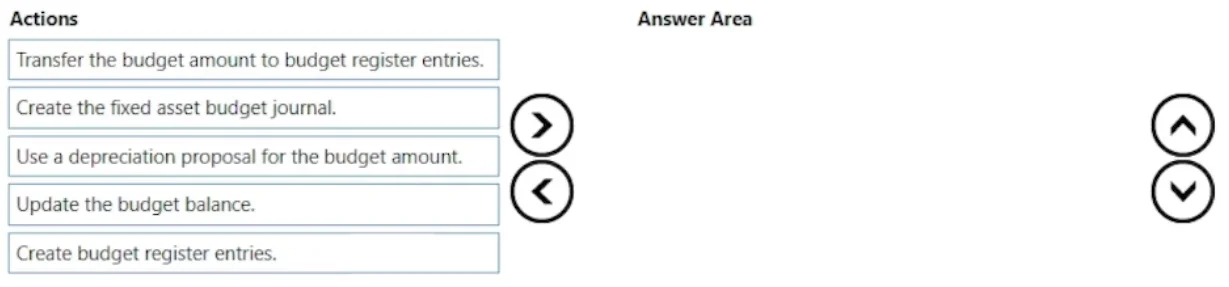
Drag and Drop Question A company uses basic budgeting functionality in Dynamics 365 Finance. The company wants to add fixed asset depreciation expenses to its budget register entry. The depreciation…
The correct answer is Create the fixed asset budget journal.; Use a depreciation proposal for the budget amount.; Transfer the budget amount to budget register entries.; Update the budget balance. Dynamics 365 Finance: Budgeting Fixed Asset Depreciation - Explanation The Core Concept When budgeting depreciation automatically, you work in the Fixed Assets module first, then push the results into the Budgeting module. The workflow crosses two modules, which is why the…
Question
Exhibit
Answer Area
Drag items
Correct arrangement
- Create the fixed asset budget journal.
- Use a depreciation proposal for the budget amount.
- Transfer the budget amount to budget register entries.
- Update the budget balance.
Explanation
Dynamics 365 Finance: Budgeting Fixed Asset Depreciation - Explanation
The Core Concept
When budgeting depreciation automatically, you work in the Fixed Assets module first, then push the results into the Budgeting module. The workflow crosses two modules, which is why the ordering is counterintuitive to some.
Step-by-Step Breakdown
1. Create the fixed asset budget journal This is the mandatory starting point. In D365 Finance, a dedicated Fixed Asset Budget Journal (under Fixed Assets > Journals) is the container that holds depreciation budget entries before they reach the Budgeting module. You cannot run a depreciation proposal without this journal existing first. It is separate from a standard general ledger journal.
2. Use a depreciation proposal for the budget amount With the journal open, you run a depreciation proposal, which automatically calculates projected depreciation based on each asset's assigned depreciation profile (straight-line, reducing balance, etc.) and posts the calculated amounts as lines in the journal. This is the "automatic calculation" the question explicitly requires - you do not enter amounts manually.
3. Transfer the budget amount to budget register entries Once the journal lines are validated, you use the Transfer to budget function. This bridges the Fixed Assets module to the Budgeting module by generating budget register entries from the journal lines. The transfer is what creates the budget register entries - you do not create them separately beforehand.
4. Update the budget balance After budget register entries exist, you must run Update budget balances. This recalculates and refreshes the budget control balances so the system recognizes the new entries for budget checking and reporting purposes.
Why "Create budget register entries" Is the Distractor
This is the most common mistake. Candidates assume budget register entries must be created manually first. In this workflow, Step 3 (Transfer) creates them automatically. Selecting "Create budget register entries" as a separate step would duplicate effort and reflects a misunderstanding of how the fixed asset budget journal transfer works.
Common Ordering Mistakes
| Mistake | Why It's Wrong |
|---|---|
| Running the depreciation proposal before creating the journal | No journal container exists to receive the proposal lines |
| Updating budget balances before transferring | Nothing has been transferred yet; balances have nothing new to calculate |
| Skipping "Update the budget balance" | Budget control and reports will not reflect the new entries until balances are refreshed |
Topics
Community Discussion
No community discussion yet for this question.