
MB-310 · Question #77
Drag and Drop Question A client has Accounts payable invoices in their legal entity in three different currencies. It is month-end, and the client needs to run the foreign currency revaluation…
Foreign Currency Revaluation in Dynamics 365 Finance - Explanation Overview Dynamics 365 Finance has two separate revaluation engines: one in the Accounts Payable (AP) subledger and one in General Ledger (GL). They serve different purposes and must be coordinated carefully to…
Question
Exhibit
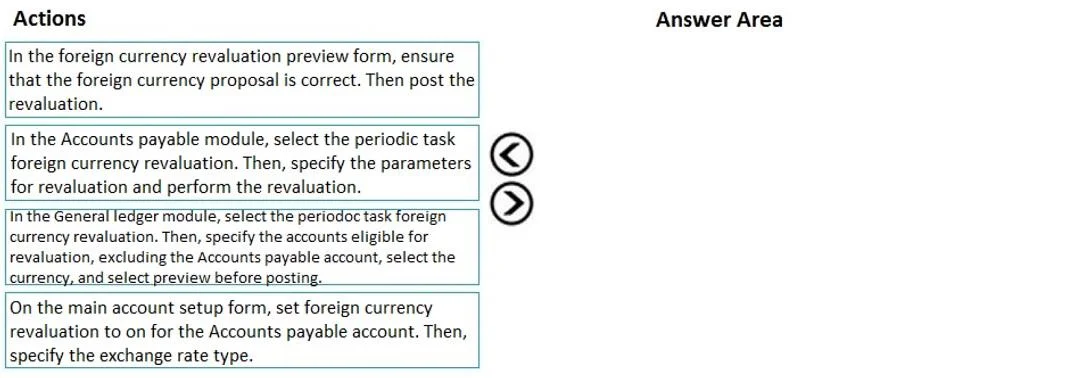
Options
- Box1On the main account setup form, set foreign currency revaluation to on for the Accounts payable account. Then, specify the exchange rate type.
- Box2In the Accounts payable module, select the periodic task foreign currency revaluation. Then, specify the parameters for revaluation and perform the revaluation.
- Box3In the General ledger module, select the periodic task foreign currency revaluation, excluding the Accounts payable account, select the currency, and select preview before posting.
- Box4In the foreign currency revaluation preview form, ensure that the foreign currency proposal is correct. Then post the revaluation.
Explanation
Foreign Currency Revaluation in Dynamics 365 Finance - Explanation
Overview
Dynamics 365 Finance has two separate revaluation engines: one in the Accounts Payable (AP) subledger and one in General Ledger (GL). They serve different purposes and must be coordinated carefully to avoid double-counting unrealized gains/losses.
Step-by-Step Reasoning
Box 1 - Main Account Setup (Exchange Rate Type + Revaluation Flag)
"On the main account setup form, set foreign currency revaluation to on for the AP account. Then specify the exchange rate type."
This must come first because it is a prerequisite configuration. Without enabling the flag on the main account and assigning an exchange rate type, neither the AP nor the GL revaluation process will know which accounts to revalue or which rate to apply. This is a one-time or infrequent setup step, but nothing else can work correctly without it.
Box 2 - AP Module Revaluation (Subledger Level)
"In the Accounts Payable module, run the periodic foreign currency revaluation with specified parameters."
The AP revaluation must run before the GL revaluation. The AP module revalues open vendor invoice transactions at the subledger level, posting unrealized gain/loss entries that reflect the currency movement on unpaid invoices. This process operates on individual open transactions, not just account balances.
Running AP first ensures the subledger is reconciled before the GL-level process runs.
Box 3 - GL Module Revaluation (Excluding the AP Account)
"In General Ledger, run foreign currency revaluation, excluding the AP account, select the currency, and preview before posting."
The AP account must be excluded here - this is the most commonly missed detail. Since the AP module already revalued the AP account at the subledger level (Box 2), including it again in the GL revaluation would double-count the unrealized gain/loss on that account.
The GL revaluation then handles any other foreign-currency balance sheet accounts (e.g., bank accounts, intercompany balances) that are not managed by a subledger.
Selecting preview before posting is a best practice - it lets you verify the proposal before committing anything to the ledger.
Box 4 - Review Preview and Post
"In the foreign currency revaluation preview form, verify the proposal is correct, then post."
Posting is always the final step. After reviewing the GL revaluation preview to confirm amounts, currencies, and accounts are as expected, you post. This creates the actual journal entries for unrealized gains/losses on the GL accounts.
Common Mistakes / Misconceptions
| Mistake | Why It's Wrong |
|---|---|
| Skipping the main account setup (Box 1) | Revaluation won't run or will use wrong rates |
| Running GL revaluation including the AP account | Causes double-counting of AP unrealized G/L |
| Running GL revaluation before AP revaluation | AP subledger and GL will be out of sync mid-process |
| Posting without previewing | Mispostings are hard to reverse at period-end |
Why Multiple Orders Are Accepted
Box 1 is always first (setup is a hard prerequisite). Box 4 is always last (post after preview). The note about multiple valid orders likely refers to flexibility within the middle steps - for example, some environments run GL revaluation and preview (Box 3) concurrently with or immediately after AP (Box 2), and the system accepts slight variations in how those steps are documented. Conceptually, Box 2 → Box 3 → Box 4 is the canonical sequence.
Topics
Community Discussion
No community discussion yet for this question.